Typed output & Parquet
Use it when the file is headed for analysis — pandas, DuckDB, Spark, a data
warehouse — and you need it to carry real column types and a real NULL, not
just text that a reader has to guess at. Name your <data>
columns, give the output a .parquet name, and TDC writes a binary, typed file — no
external libraries, no extra flags.
Every output so far on this site has been text: CSV, JSON, SQL. That's fine for people and for anything that reads characters. For data analysis it has two problems that Parquet solves.
- No types. In CSV everything is a string. A data scientist loads the file and has
to guess all over again which column is a number, which is a date, which is plain
text — and guesses wrong:
007becomes7, and a document number is quietly corrupted. - No NULL. Nothing between two commas — is that "empty text" or "no value at all"?
missingemits an empty string, and the distinction is lost.
Parquet is the columnar binary format that analytics tools standardize on. Each column
has a real type and a real NULL, and the file opens in one line —
pd.read_parquet("data.parquet") — with nothing left to repair.
Example outputs below are illustrative — exact values can differ by core version and
seed. What matters is the shape: the schema line per column, and where a real
null appears.
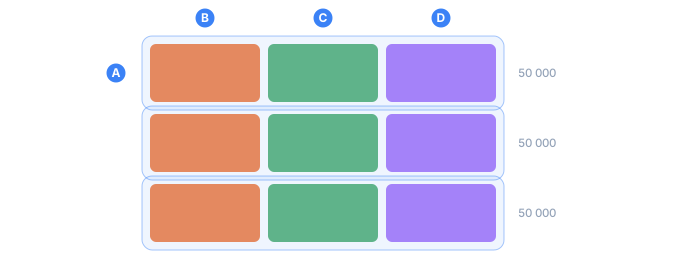
- Aa row group: a slice of rows, assembled, written, and released
- Bthe first column of that slice, stored on its own
- Cthe second column
- Dthe third — a reader that needs one column touches only its chunks
Turning it on
Two things: mark which <data> tags are
columns, and name the file .parquet.
A column is a <data> with a name attribute. Without name the tag stays
ordinary formatting text and never reaches the file. The type is set with type.
<block>
  <line>
    <data name="id"         type="int64">${{Id}}</data>
    <data name="reading"    type="int64">${{Reading}}</data>
    <data name="is_outlier" type="bool">${{IsOutlier}}</data>
    <data name="city"       type="string">${{City}}</data>
    <data name="amount"     type="int64|null">${{Amount}}</data>
  </line>
</block>
The format is chosen by the file extension — no new flag:
tdcv2 data.tdc -o data.parquet     # binary, typed
tdcv2 data.tdc -o data.csv         # text, exactly as before
Here is what someone opening the file sees — a schema (type per column), then the rows:
id          INT64       REQUIRED
reading     INT64       REQUIRED
is_outlier  BOOLEAN     REQUIRED
city        BYTE_ARRAY  REQUIRED  {"type":"STRING"}
amount      INT64       OPTIONAL

{"id":1,"reading":45, "is_outlier":false,"city":"Chicago","amount":2143}
{"id":2,"reading":54, "is_outlier":false,"city":"Chicago","amount":2328}
{"id":3,"reading":42, "is_outlier":false,"city":"Austin", "amount":5275}
{"id":4,"reading":42, "is_outlier":false,"city":"Denver", "amount":null}
{"id":5,"reading":540,"is_outlier":true, "city":"Denver", "amount":5787}
{"id":6,"reading":53, "is_outlier":false,"city":"Austin", "amount":3308}
Two details worth pausing on. amount on row 4 is a real null (the column is
OPTIONAL), not an empty string — missing finally
coming through the way it should. And is_outlier is a real BOOLEAN: a marker column
from anomaly_flag, which gives you a labeled dataset
ready to test an anomaly detector against.
The types you can write
type= | What it is | Read from text |
|---|---|---|
bool | true / false | true/false, 1/0 |
int32 | 32-bit integer | -42 |
int64 | 64-bit integer | 9007199254740993 — exact |
double | 8-byte float | 3.14, 1e3 |
string | UTF-8 text | as-is |
date | calendar date | 2020-05-14 |
timestamp | instant in time | ISO-8601 |
decimal(p,s) | exact decimal (money) | 123.45 — no rounding. Precision 1–18, scale 0–precision: the values are carried in an INT64, so 18 digits is the ceiling (TDC194) |
uuid | UUID as 16 bytes | canonical form |
json | JSON | as-is |
float | 4-byte float | 3.14 — half the space of double |
float16 | 2-byte float | 3.14 — ~3 significant digits |
enum | enumerated text | RED — a string, but tagged |
uint8/16/32/64 | unsigned integer | 255 — rejects a negative |
Add \|null after the type to make the column nullable: type="int64\|null".
Without it an empty value is an error — a free quality gate: if a column shouldn't
be empty, TDC says so.
decimal never rounds silentlydecimal(18,2) with the value 123.456 is an error, not a lost cent.
float and float16 deliberately give up precision — that's the point: they take
less space. 0.1 becomes 0.100000001490116 as a float and 0.0999755859375 as a
float16. The value stored is exactly what the reader will see (TDC rounds up front, so
statistics never describe numbers the file doesn't contain). Going out of range (1e40
for float, 100000 for float16) is an error, not a silent infinity.
uint64 holds numbers up to 18,446,744,073,709,551,615 — larger than int64. A
negative value in such a column is an error.
You can skip type= — TDC infers it
The engine knows which generator produced a column, so in most cases type= is
unnecessary. Here is a config with no type= anywhere:
<sequence name="Id"><gen type="increment" value="1"/></sequence>
<sequence name="Price"><gen type="number" value="1..999" decimals="2"/></sequence>
<sequence name="Qty"><gen type="number" value="1..99" missing="0.4"/></sequence>
<sequence name="Born"><gen type="date" range="1990-01-01..2000-12-31" format="YYYY-MM-DD"/></sequence>
<sequence name="Key"><gen type="template" value="common.id.uuid"/></sequence>
<sequence name="R"><gen type="number" value="10..20" anomaly="0.4" anomaly_flag="Flag"/></sequence>
...
<data name="id">${{Id}}</data>
<data name="price">${{Price}}</data>
<data name="qty">${{Qty}}</data>
<data name="born">${{Born}}</data>
<data name="key">${{Key}}</data>
<data name="flag">${{Flag}}</data>
What TDC worked out on its own:
id     INT64                REQUIRED
price  DOUBLE               REQUIRED
qty    INT64                OPTIONAL
born   INT32                REQUIRED  {"type":"DATE"}
key    FIXED_LEN_BYTE_ARRAY REQUIRED  {"type":"UUID"}
flag   BOOLEAN              REQUIRED

{"id":1,"price":230,"qty":63, "born":"1996-05-25","key":"e96b21bc-...","flag":true}
{"id":2,"price":589,"qty":null,"born":"2000-05-01","key":"85caccad-...","flag":false}
The rules are simple: a number without decimals → integer,
with decimals → float; an increment counter → integer;
common.id.uuid → UUID; an anomaly_flag marker column →
boolean, and so is a <mix flag=> column. And handily,
missing makes the column nullable
on its own (qty came out OPTIONAL).
So does anything else in the config that can leave a cell empty: a
parent=, or a
conditional sequence with no
fallback branch. Those rows come out null, not as an error about a required column.
Computed columns are typed too, by the same reasoning — what they can produce is known before a single row exists:
| generator | column type |
|---|---|
timeseries, pattern | integer, or float with decimals |
running | the type of the column its of= names |
stat | count → integer; mean, median, stddev → float; sum, min, max → the source's type |
formula | integer or float when decimals= is given, text otherwise |
file with read="quantile" | float, or integer with decimals="0" |
increment / decrement | integer, or float when value= or step= is fractional |
<mix> | the shared type when every branch is a single <gen> that derives to it; string on any disagreement, or when a branch holds literal text. A <mix flag=> column is boolean |
<gen if> branches | the shared type, by the same rule as <mix> |
a field: ${{Seen.room}}, ${{Address.city}} | the type of the field it reads, through any number of pool links |
The formula row is the odd one out on purpose. expr="A + 1" is a whole number,
expr="A / 2" is not, and expr="A > 5 ? over : under" is a WORD — so decimals= is
the one honest signal of what the column holds. Write decimals="0" when the answer is
whole and you want an integer column.
The order is: an explicit type=, then inference from the generator, then text.
TDC never guesses a type from the values themselves — that's exactly what corrupts
CSV (007 → 7). When TDC isn't sure, the column stays a string: a string breaks
nothing.
A quantile read is the one row on that table where the file
generator is typed at all, and for the usual reason: read="quantile" means the file has
to be numeric or the run refuses, so the column is a number by construction — a fact
about the generator, not a guess from the values. An ordinary file read is still text,
because a file is a bag of whatever the file holds.
Which number comes from the config alone, since this layer never opens the file.
decimals="0" is the one declaration that promises whole values; without it the precision
comes from the source and may be fractional, so the answer is a float. That is the safe
direction — a float holds every value such a column can produce, and 31 written as
31.0 loses nothing, where text loses the type outright:
<sequence name="Amount"><gen type="file" src="amounts.txt" read="quantile"/></sequence>
<sequence name="Age"><gen type="file" src="ages.txt" read="quantile" decimals="0"/></sequence>
amount comes out DOUBLE, age comes out INT64. Declare type= by hand if you want
something narrower.
Three cases where inference is deliberately skipped
- A
datewithoutformat="YYYY-MM-DD". By default a date prints as05/25/1996, which isn't ISO — calling that adatewould be dishonest. - A
maskorcaseon the generator. These rewrite the text, so a number is no longer a number. missing_ason the generator. A missing value is printed as a word such asNULL, so the column holds text.
In all three cases set type= by hand if you know what you're doing.
When a value doesn't fit its type
TDC never writes a corrupt file — it stops and says exactly where:
tdc: column "n", row 1: "abc" is not an integer (int64)
A typo in the type name itself is caught by the validator before generation
even starts (code TDC194).
Large volumes — row groups
The file is written in row groups (50,000 rows each): a group is assembled, written, and freed, so memory doesn't grow with the row count. 120,000 rows is three groups, and a reader can skip whole groups without parsing the file end to end. This is the same streaming behavior that keeps large outputs flat in memory.
Those same groups give you parallelism. A group's bytes don't depend on where it sits in the file: page headers record the sizes, and every offset is collected in the footer. Threads can therefore assemble groups independently. At the end a coordinator lays them down back to back and writes a single footer with corrected offsets.
Work is split by group, not by row — cut a group in half and you'd get groups a single-threaded run never produces. So the output is identical byte for byte at any thread count. On a million rows:
--jobs 1    6.51 s
--jobs 4    2.51 s
--jobs 8    2.18 s      <- files of all three runs are identical
One condition: it needs a real file (-o) — the .parquet
extension on that path is what selects the writer, and without -o the run prints text
instead. Parallel writing needs the file too: the coordinator has to know where each group
landed.
Set the thread count with --jobs if you like; the bytes are the
same either way.
Lists
A column can hold a list of values rather than one: type="[]int64", or just
repeat on the generator, in which case the type is
inferred. An empty list, and a null inside a list, both come through faithfully.
<data name="scores" type="[]int64">${{Scores}}</data>
scores  INT64  OPTIONAL  (repeated)

{"scores":[45,52,61]}
{"scores":[]}
{"scores":[70,null,55]}
Fast queries — column statistics
For every column TDC records the minimum, maximum, and NULL count. That lets a
reader skip whole blocks: for a query like amount > 500, it checks the block's
maximum and, if that maximum is below 500, never parses the block at all.
Comparison follows the format's rules, not JavaScript's: strings compare by their
UTF-8 bytes. In ASCII an uppercase letter sorts before a lowercase one, so
"Apple" < "apple" < "zebra", and any non-ASCII text sorts after all ASCII — a stable,
portable order every Parquet reader agrees on.
The file also declares that order in its footer (column_orders). Without that
declaration the format says a reader must ignore the bounds, however correct they
are — Java-based readers drop string min/max outright. TDC had been writing correct
bounds no reader was permitted to use; it now writes the declaration beside them.
Repeated values are stored once
When a column has few distinct values — cities, statuses, categories — TDC stores them with a dictionary: the list of values once, and each row a small number pointing into it. The decision is automatic, made from the data. On 50,000 rows:
| column | distinct values | dictionary | size |
|---|---|---|---|
city | 5 | yes | 18 KB |
status | 3 | yes | 12 KB |
uuid | 50,000 | no — not worth it | 781 KB |
A dictionary would only hurt a column of unique values, so TDC doesn't build one there.
The rule is simple: use a dictionary when the distinct count is at most half the row
count — except a bool, which never gets one. A boolean already costs a bit, so a
dictionary could only add a page. Two distinct values over 2,000 rows is well under half
and still gets PLAIN alone, where an int64 and a string beside it both get
RLE_DICTIONARY.
Compression
Pages are compressed with snappy — the Parquet standard every reader understands. On a real 50,000-row, 14-column set:
no compression, no dictionary:  5.70 MB
now:                            1.99 MB      <- nearly a third the size
Compression is chosen per column, and only when it wins. Snappy has overhead bytes,
and on a very small page they cost more than they save — TDC leaves such a column
uncompressed. A 5-value city column over 50,000 rows takes that route: 18,839 bytes in,
18,839 out, codec UNCOMPRESSED. A uuid column over the same rows goes the other way and
snappy saves 209 KB of 2 MB.
The decision is made on the page, not on the chunk, so a chunk that compresses to almost nothing can still end a couple of bytes larger than it went in — one measured case is 99 bytes in and 101 out. Two bytes on a file that is otherwise a third of its raw size; worth knowing, not worth avoiding.
It's implemented in TDC's own code, with no third-party library — and not just to keep the dependency list short: two snappy implementations can emit different (though equally valid) bytes for the same data, and a shared encoder is what lets all five implementations produce byte-identical files at the same version.
Reading it back in pandas
The payoff is on the reader's side. One line, and the frame already has the right dtypes
and real NaN where the file had null — nothing to clean:
import pandas as pd

df = pd.read_parquet("data.parquet")
print(df.dtypes)
id             int64
reading        int64
is_outlier      bool
city           object
amount        float64
dtype: object
id and reading are integers, is_outlier is a genuine boolean, city is text, and
amount — the nullable column — comes back as float64 so it can hold NaN for the
missing rows (ask pandas for its nullable backend with
pd.read_parquet(..., dtype_backend="numpy_nullable") to keep it a nullable Int64).
The frame itself:
   id  reading  is_outlier     city  amount
0   1       45       False  Chicago  2143.0
1   2       54       False  Chicago  2328.0
2   3       42       False   Austin  5275.0
3   4       42       False   Denver     NaN
4   5      540        True   Denver  5787.0
Row 4's amount is NaN, not an empty string — the null survived the round trip. For
the full library API in each language, see Language bindings.
Maps
A column can hold a map — type="{}int64" is a map from text to int64. The
cell reads key:value pairs, separated the same way a list's elements are:
<data name="gauges" type="{}int64|null">cpu:${{Cpu}},mem:${{Mem}}</data>
host    STRING  REQUIRED
gauges  MAP<STRING, INT64>  REQUIRED

{"host":"db-1",  "gauges":{"cpu":74,"mem":null}}
{"host":"db-1",  "gauges":{"cpu":65,"mem":43}}
{"host":"web-1", "gauges":{"cpu":15,"mem":15}}
{"host":"web-1", "gauges":{"cpu":10,"mem":12}}
{"host":"web-2", "gauges":{"cpu":6,"mem":null}}
The reader gets a real map, not a string it has to pull apart — gauges['cpu'] is
a query, and missing= on the generator behind a value comes through as a genuine
null inside it.
The key is always text. Parquet does not allow a null key, a cell arrives as
text anyway, and a second type parameter would double the syntax to buy a
conversion nobody has asked for. So {}T reads "a map from text to T" and there
is nothing else to decide. |null binds to the VALUE, exactly as it binds to a
list's element.
Writing the cell
- The key is everything before the first
:; the value is the rest. So a value may hold colons —start:12:30:00is one pair — and a key may not. - An empty cell is an empty map, the same rule a list follows.
- Three things are refused rather than guessed at, because each would leave
you with a map quietly missing an entry: a piece with no
:at all, an empty key, and a key that repeats inside one row (readers disagree about which of the two wins, and some drop the row's map entirely).
Not yet supported
- zstd / brotli compression — snappy is here; these aren't yet.
- Dictionaries for floating-point numbers work, but the win is usually smaller — repeats among floats are rare.
- Lists of lists —
[]int64and{}int64both work, but[][]int64does not: it would need a second separator, and no shape for one has earned its place yet. - Geometry types — added one at a time; each is just a label over the same bytes.
float, float16, and enum used to be listed here as unimplemented — they now work
and produce the correct logical types (FLOAT, FLOAT16, ENUM).
See also
- Output formats (CSV, JSON, SQL…) — the text side of the same output block, and where each format's syntax trips you up.
- Output & formatting —
<block>,<line>, and<data>in full. - Large outputs & streaming — row groups,
--jobs, and flat memory at any size. - CLI —
-o,--jobs,--engine. - Masks & case —
mask/case, which switch type inference off. - Language bindings — read and write from all five: TypeScript, Python, Java, C# and Rust.