Masks & case
A generator produces raw values — exactly as they're built. A US Social Security
number is nine digits in a row, a date is 2020-05-14, a name comes out exactly as it
sits in the list. A generator is about what the data is, not how it looks:
separators, case, and word order aren't its job.
Here's what a plain text generator emits for a batch of
SSNs (order="sequential" so the values below stay stable and repeat in order):
<gen type="text" value="378984323,889735724,852139753,263243158" order="sequential"/>
378984323
889735724
852139753
263243158
The values are valid, but reading them like this is painful. Formatting reshapes an already-generated value on its way out, and it always has three parts:
raw value → processor → finished look — for example, 378984323 → mask
xxx-xx-xxxx → 378-98-4323.
There are two independent processors:
- mask — cuts the string into pieces and puts separators between them (
x,w,*); - case —
upper,lower,capitalize,title.
On top of those come the operations slice, replace, trim, group, and compact
(all below), the escaping filters csv / sql, and order="sequential" for taking
values in order instead of at random.
Example outputs are illustrative — exact values can differ from one core version to the next. What matters is the shape of each transformation.
running and stat read a column that already exists and publish the number as it
stands, so mask=, case=, missing=, repeat= and anomaly= on those two are
refused (TDC015) rather than accepted and ignored. Reach for the filter at the point the
value is printed instead — ${{Total|mask:x}} — which runs after the number is final.
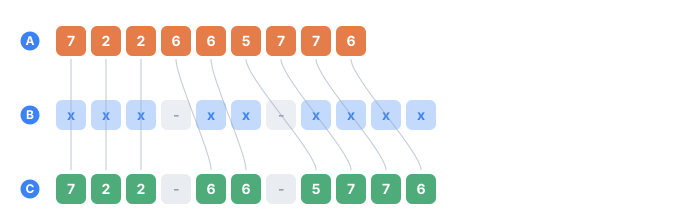
- Athe generated value, before the mask
- Bthe mask: an x is a slot, and anything else is a literal kept as-is
- Cthe result — the curves show which source character filled which slot
Three routes, one behavior
The same formatting is available three ways — same result, pick what's convenient:
| Route | How you write it | Best when |
|---|---|---|
| A filter in interpolation | ${{X | mask:…}} | one value in one spot in the text |
An attribute on <gen> | <gen … mask="…" case="…"/> | formatting the whole generator |
A tag in <compute> | <mask pattern="…">…</mask> | when formatting is a step in a calculation |
Most examples below use the filter route, which lives in interpolation. Each compute tag is documented in Strings & formatting.
Mask — cut and space out
Problem. A number arrives as one glued-together string (378984323) — you can't
see where the groups start and end.
Tool. A mask runs its pattern left to right. Each slot eats a piece of the input; everything else prints as a literal:
| Slot | Takes from the input |
|---|---|
x | one character |
w | one word (letters up to a space) and swallows one space |
* | everything not yet consumed |
x[0] w[-1] | a named position — see Moving pieces |
\ | escapes the next character (\x → a literal x) |
| anything else | a literal: dash, dot, space, brackets — printed as-is |
The same digits under two patterns:
<sequence name="Ssn">
  <gen type="text" value="378984323,889735724,852139753,263243158" order="sequential"/>
</sequence>
...
<data>${{Ssn}}  ->  ${{Ssn | mask:xxx-xx-xxxx}}   |   ${{Ssn | mask:xxx.xx.xxxx}}</data>
378984323  ->  378-98-4323   |   378.98.4323
889735724  ->  889-73-5724   |   889.73.5724
852139753  ->  852-13-9753   |   852.13.9753
263243158  ->  263-24-3158   |   263.24.3158
On the left is the raw value, then the same SSN under two masks. Swap the separators in the pattern and you get a different look — same data.
The w slot — work by words
Problem. Starting from first last, you need to assemble your own layout. The w
slot takes a word and swallows one space after it:
<sequence name="Name"><gen type="text" value="james miller,mary jones,anna lee" order="sequential"/></sequence>
...
<data>${{Name}}  ->  ${{Name | mask:w:w}}</data>
james miller  ->  james:miller
mary jones    ->  mary:jones
anna lee      ->  anna:lee
w grabbed james, ate the space, printed the literal :, and the second w grabbed
miller. There's no space before the : — the first w swallowed it. The full
edge-case detail is on <mask>.
Moving pieces — x[0], w[0] and ranges
Problem. The value arrives whole and in the wrong order. A name comes out of a
pack as james miller, but the export wants the surname first. A street address is
12 Baker St, and the country you're generating for writes the number last. The parts
were never yours to arrange: the string came out of a file column, a pack address, or a
regex, so you can't just generate two sequences and print them in the other order.
Tool. Put an index in brackets on a slot. It names a position in the original input:
| Slot | Takes |
|---|---|
x[7] | the character at index 7 — the eighth, counting from x[0] |
x[5..7] | characters 5, 6 and 7 — both ends included |
x[-1] | the last character |
w[1] | the word at index 1 — the second |
w[-1] | the last word |
Indices start at 0, like the slice filter. Ranges are
written with .., the same as everywhere else in TDC (value="10..99",
repeat="1..5") — a hyphen would be ambiguous next to x[-1].
That's the entire addition to the syntax. Two examples, both real problems:
<data>${{Name}}  ->  ${{Name | mask:w[-1], w[0]}}</data>
<data>${{Addr}}  ->  ${{Addr | mask:w[1..-1] w[0]}}</data>
james miller   ->  miller, james
mary jones     ->  jones, mary
anna lee       ->  lee, anna

12 Baker St -> Baker St 12
7 Elm Road -> Elm Road 7
140 Oak Lane -> Oak Lane 140
Neither one depends on how long the words are — that's the point of counting words
rather than characters. w[-1] is the last word whether the name has two parts or
four, and w[1..-1] is "everything except the first".
What actually happens: the pool
A mask with an index does two separate things that don't interfere with each other.

- Athe original value, each position numbered
- Bwhat the mask produced
- the position an index named, and where it landed
- what the bare slots took, in their original order
The first is what gets printed: an index reads that position of the original, and
nothing can change that. The second is what the bare x / w / * slots still have
to work with — and that's the only thing consumption affects. A position an index has
taken is out of the pool:

- Athe original value, before the indexed pick
- Bthe pool the bare slots draw from — the position an index took is gone
- the position x[4] named
This is why * is worth a second look: it means everything not yet consumed, not
"the tail of the string". Move two digits to the front and * still prints the other
nine:
<data>${{Phone}} -> ${{Phone | mask:x[9]x[10] xxx-xxx-xxx}}</data>
26324315851  ->  51 263-243-158
19875550142  ->  42 198-755-501
44207946001  ->  01 442-079-460
The same index twice — a copy instead of a move
Nothing stops two slots from naming the same position. When they do, that part is printed twice — which is how you get a warehouse code whose head repeats at the tail:
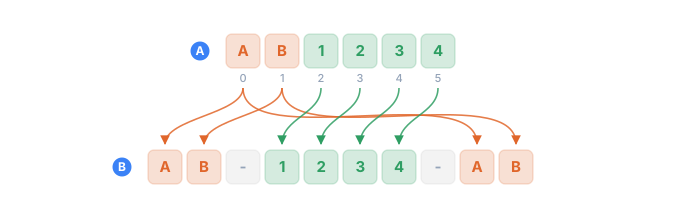
- Athe original code, each position numbered
- Bthe result — ten characters out of six
- the two characters named twice, printed at both ends
- the rest, taken by * in their original order
<data>${{Sku}} -> ${{Sku | mask:x[0..1]-*-x[0..1]}}</data>
AB1234  ->  AB-1234-AB
CD5678  ->  CD-5678-CD
EF9012  ->  EF-9012-EF
Which brings up the one thing the notation can't tell you on its own: x[2] doesn't
say whether it's a move or a copy. It's a copy if some other slot names that position
too, and a move if none does. You find that out by reading the whole mask, not the one
slot.
x[-1..0] means "from the last character to the first" — a reversal that doesn't care
how long the value is. AB1234 becomes 4321BA. Useful for building deliberately
mangled test data; not something to reach for otherwise.
Three things that will catch you
A bracket is an index only right after x or w. Anywhere else it's an ordinary
literal, so mask="[tel.] xxx-xxx" needs no escaping at all. If you do want a literal
bracket directly after a slot, escape it: mask="x[1]\[*\]" on ABC gives B[AC].
An index past the end prints nothing, silently. w[4] on a two-word value gives an
empty string, exactly like an x past the end of a short value. The input length isn't
known until the row is generated, so there's nothing to check in advance — and killing a
million-row run over one short value would be worse. Watch for empty cells when you use
a fixed index on data whose shape varies; w[-1] is usually the safer way to say "the
last one".
A hyphen in a range is refused, not guessed. x[1-2] is the easy typo, and if it
were treated as literal text it would quietly produce wrong data. You get
TDC199 instead, reported before a single row is
generated:
error[TDC199]: mask: invalid index "[1-2]" after "x" — use x[0], x[0..4] or x[-1]
Case — upper / lower / capitalize / title
Problem. Data arrives in mixed case, from different sources and imports:
iPhone CASE, mary JONES. You need one consistent form.
| Name | Does |
|---|---|
upper | ALL UPPERCASE |
lower | all lowercase |
capitalize | only the first letter uppercase, the rest as-is |
title | the first letter of each word uppercase, rest as-is |
The same string through all four:
<sequence name="W"><gen type="text" value="iPhone CASE,mary JONES,ANNA von lee" order="sequential"/></sequence>
...
<data>${{W}}  ->  upper=${{W | upper}} | lower=${{W | lower}} | capitalize=${{W | capitalize}} | title=${{W | title}}</data>
iPhone CASE   ->  upper=IPHONE CASE | lower=iphone case | capitalize=IPhone CASE | title=IPhone CASE
mary JONES    ->  upper=MARY JONES | lower=mary jones | capitalize=Mary JONES | title=Mary JONES
ANNA von lee  ->  upper=ANNA VON LEE | lower=anna von lee | capitalize=ANNA von lee | title=ANNA Von Lee
capitalize touches only the very first character (iPhone CASE stays almost as-is —
its leading i becomes I), while title raises the first letter of every word
(von → Von, lee → Lee). upper and lower change everything.
Different case by condition, on the same data
Because formatting happens on output, you can apply a different case per row to the same generator — say male surnames capitalized and female ones in all caps:
<line if="Gender == M"><data>${{Gender}} ${{Word}}  ->  ${{Word | capitalize}}</data></line>
<line if="Gender == F"><data>${{Gender}} ${{Word}}  ->  ${{Word | upper}}</data></line>
F miller  ->  MILLER
M miller  ->  Miller
F jones   ->  JONES
F brown   ->  BROWN
M davis   ->  Davis
M jones   ->  Jones
There's one generator, Word, but how it looks depends on Gender. You can't do this
inside the generator itself — formatting on output does it in a single line.
As a <gen> attribute — format the whole column
Problem. You don't want to wrap every substitution — you want the whole column to come out already formatted.
Tool. Put mask="…" or case="…" right on the <gen>.
On the left is the generator without the attribute (raw); on the right is the same one
with mask=:
<sequence name="Raw"><gen type="text" value="378984323,889735724,852139753,263243158" order="sequential"/></sequence>
<sequence name="Nice"><gen type="text" value="378984323,889735724,852139753,263243158" order="sequential" mask="xxx-xx-xxxx"/></sequence>
...
<data>${{Raw}}  ->  ${{Nice}}</data>
378984323  ->  378-98-4323
889735724  ->  889-73-5724
852139753  ->  852-13-9753
263243158  ->  263-24-3158
This is exactly how you give a preset generator its "pretty" look:
<gen type="template" value="usa.docs.ssn" mask="xxx-xx-xxxx"/>
<gen type="template" value="common.payment.card.pan" mask="xxxx xxxx xxxx xxxx"/>
Both addresses come from the template
generator. If both attributes are set, the order is mask first, then case.
Filter chains — several operations in a row
Problem. You need more than one transform — say, reshape with a mask and raise the case.
Tool. Pipe filters one after another with |, left to right — raw → mask → case:
<sequence name="Name"><gen type="text" value="james miller,mary jones,anna lee" order="sequential"/></sequence>
...
<data>${{Name}}  ->  ${{Name | mask:w:w}}  ->  ${{Name | mask:w:w | upper}}</data>
james miller  ->  james:miller  ->  JAMES:MILLER
mary jones    ->  mary:jones    ->  MARY:JONES
anna lee      ->  anna:lee      ->  ANNA:LEE
The middle column is the value after the mask; the right one is after the mask and
upper. Each filter takes the previous one's result.
A mask argument reads up to the next | or the closing }}, so spaces and colons live
happily inside it (mask:w:w, mask:xxx-xx-xxxx).
More filters: slice, replace, trim, group
These use two of the three routes — the filter and the
<compute> tag. mask and case are the only two of the
family that exist as <gen> attributes; writing slice= or trim= on a <gen> is
TDC015, so for the rest, format where the value is printed. Each one below follows
raw → tool → result, with a variation.
slice — cut a part by index
Problem. From the date 2020-05-14 you need only the year, or only the month.
<sequence name="D"><gen type="text" value="2020-05-14,2022-11-03,2021-07-19" order="sequential"/></sequence>
...
<data>${{D}}  ->  year=${{D | slice:0,4}} | month=${{D | slice:5,7}} | tail=${{D | slice:5}}</data>
2020-05-14  ->  year=2020 | month=05 | tail=05-14
2022-11-03  ->  year=2022 | month=11 | tail=11-03
2021-07-19  ->  year=2021 | month=07 | tail=07-19
slice:0,4 is characters 0–3 (the year), slice:5,7 is 5–6 (the month), and slice:5
with no second number means "from 5 to the end". The indices are character positions,
counting from zero. See <slice>.
replace — replace every occurrence
Problem. The date has dashes, but you need a different separator.
<data>${{D}} -> slash=${{D | replace:-,/}} | dot=${{D | replace:-,.}}</data>
2020-05-14  ->  slash=2020/05/14 | dot=2020.05.14
2022-11-03  ->  slash=2022/11/03 | dot=2022.11.03
2021-07-19  ->  slash=2021/07/19 | dot=2021.07.19
The format is replace:from,to, and all occurrences are replaced. Three things it
does not do, each of which fails quietly rather than loudly:
fromis matched literally, never as a regular expression.replace:[abc],Zlooks for the five characters[abc]and, finding none, changes nothing.fromcannot contain a comma. The first comma ends it, so everything after belongs toto—replace:-,+,xreplaces each-with+,x.- An empty
fromis refused.replace:,+andreplaceon their own have nothing to look for, so TDC275 stops the run rather than letting the filter do nothing quietly. To DELETE, give the second part instead:replace:-,.
Where any of those matter, use the <replace> tag
in <compute> instead: it takes from= and to= as separate attributes, so a comma is
just a character.
trim — strip outer spaces
Problem. Data from a file or a CSV sometimes carries stray spaces at the edges. Here the spaces are added on purpose, as if they'd come in from a source, and the brackets in the text are only there to make them visible:
<sequence name="City"><gen type="text" value="Austin,Denver,Boston" order="sequential"/></sequence>
<!-- glue extra spaces on the edges, imitating "dirty" data -->
<sequence name="Padded">
  <compute><result><concat><str v="  "/><field name="City"/><str v="   "/></concat></result></compute>
</sequence>
...
<data>[${{Padded}}]  ->  [${{Padded | trim}}]</data>
[  Austin   ]  ->  [Austin]
[  Denver   ]  ->  [Denver]
[  Boston   ]  ->  [Boston]
Only the edges are touched — spaces inside the value are left alone. See
<trim>.
group — group digits from the right
Problem. A long number is unreadable: 1234567.
<sequence name="N"><gen type="text" value="1234567,89150000,42" order="sequential"/></sequence>
...
<data>${{N}}  ->  group:3=${{N | group:3}} | group:3,-=${{N | group:3,-}} | group:4=${{N | group:4}}</data>
1234567   ->  group:3=1 234 567 | group:3,-=1-234-567 | group:4=123 4567
89150000  ->  group:3=89 150 000 | group:3,-=89-150-000 | group:4=8915 0000
42        ->  group:3=42 | group:3,-=42 | group:4=42
Grouping runs from the right, so the short group ends up on the left (1 234 567).
group:3 gives you thousands (the default separator is a space), group:3,- sets your
own separator, and group:4 reads like the blocks on a card. 42 is shorter than a
single group, so it comes back unchanged. See
<group>.
A decimal number is grouped the way a person groups one: the digits before the
separator, and nowhere else — 1234567.89 becomes 1 234 567.89, and a leading -
stays outside the grouping. Only that exact shape counts as a number, so a card number
and any other string keep the plain right-to-left chunking.
Summary
| Operation | Filter | <compute> tag |
|---|---|---|
slice | slice:from[,to] | <slice from="0" to="4"> |
replace | replace:from,to | <replace from="-" to="/"> |
trim | trim | <trim> |
group | group:size[,sep] | <group size="3" sep=" "> |
compact | compact or compact:16 | — |
csv | csv | — (no tag) |
sql | sql | — (no tag) |
json | json or json:; | — (no tag) |
The argument is checked before the run. slice:5,2 ends before it starts and would have
emptied the column; group:0, compact:1 and compact:99 are numbers the filter cannot
use and would have passed the value through unchanged; trim:junk puts an argument on a
filter that reads none. All five used to be accepted in silence — the config said one
thing and the output did another. They are now TDC273, TDC274 and TDC275.
Order — order="sequential"
Problem. By default, text and
file pick values at random. Sometimes the data has an
order you meant to keep — a list in a file, a numbered series.
Tool. order="sequential": row i takes the i-th value in order, cycling when
it runs off the end. On the left is the ordinary (random) generator; on the right is the
same list, Jan,Feb,Mar, in order:
<sequence name="Rand"><gen type="text" value="Jan,Feb,Mar"/></sequence>
<sequence name="Seq"><gen type="text" value="Jan,Feb,Mar" order="sequential"/></sequence>
...
<data>random=${{Rand}}   sequential=${{Seq}}</data>
random=Feb   sequential=Jan
random=Feb   sequential=Feb
random=Mar   sequential=Mar
random=Jan   sequential=Jan
random=Jan   sequential=Feb
random=Feb   sequential=Mar
random=Mar   sequential=Jan
The right column runs strictly Jan, Feb, Mar, Jan, Feb, Mar, Jan… — around and around.
order="random"— the default.order="sequential"— strictly in order, cycling.cycle="false"— fail with a clear error when the data runs out, instead of cycling.- It works the same way for files:
<gen type="file" src="@data/cities.txt" order="sequential"/>emits the file's lines strictly in the order they appear in.
compact — a long number, written short
This turns an integer into base-36 (digits plus lowercase letters). It is useful when a number is a unique tail that a person still has to read:
<data>${{F|lower}}.${{L|lower}}.${{Id|compact}}@example.com</data>
james.miller.1@example.com          <- first row
mary.jones.lfls@example.com         <- millionth
david.brown.x2qxvk@example.com      <- two-billionth
| Number | Decimal | compact |
|---|---|---|
| 1,000,000 | 7 digits | lfls — 4 chars |
| 2,000,000,000 | 10 digits | x2qxvk — 6 chars |
| 1,000,000,000,000 | 13 digits | cre66i9s — 8 chars |
Six characters cover 2.17 billion rows, and seven cover 78 billion. The mapping is one-to-one, so different numbers always give different strings — the uniqueness you added the number for survives intact.
Lowercase only, deliberately. Base-62 (with capitals) would be shorter still, but
plenty of systems lowercase email addresses — aB and Ab would then collapse into one
address, and the duplicates would come back silently.
Set the base with compact:16 (hex). A value that isn't an integer is left untouched.
Escaping for a format: csv and sql
<data> builds text and knows nothing about the file you're writing, so a value
with a comma in it silently splits a CSV row, and an apostrophe breaks SQL. This isn't
theory: one product name like Knife set, 3 pcs can turn thousands of rows into records
with an extra field — category slides into price, price into quantity, and not a single
error is raised. Two filters close both holes.
csv — an RFC 4180 field
<data>${{Id}},${{Name | csv}},${{Category}}</data>
7,"Knife set, 3 pcs",Kitchen
2,"Coffee ""Arabica"" 250g",Grocery
Quotes are always added, not added "when needed" — a rule with no exceptions beats a guess that eventually runs into a comma or a newline, and any CSV reader takes the extra quotes in stride. See also Output formats → CSV.
The filter accepts a delimiter — csv:; — and does not read it. Because the quoting
is unconditional, the delimiter cannot change the answer; the argument is allowed so a
semicolon file can say so at the call site, and it is the one filter argument that is
deliberately ignored rather than refused.
One thing the filter deliberately does not do: values starting with =, +, - or
@ become live formulas when the file is opened in a spreadsheet. Generated data keeps
its bytes as generated — if your file is destined for Excel and that matters, prefix
such values yourself with a replace filter.
sql — the body of a string literal
<data>INSERT INTO t VALUES ('${{Last | sql}}');</data>
INSERT INTO t VALUES ('O''Brien');The filter doubles the apostrophe and returns only the contents, with no outer quotes — you write those yourself, so the shape of the query stays visible in the config.
This is standard-SQL quoting (PostgreSQL, SQLite, Oracle, ANSI). MySQL in its
default mode also treats \ as an escape character — either enable
NO_BACKSLASH_ESCAPES there, or double backslashes yourself with replace first.
json — a complete JSON value
<data>{"name": ${{Name | json}}, "note": ${{Note | json}}, "tags": ${{Tags | json:;}}}</data>
{"name": "Coffee \"Arabica\" 250g", "note": "fragile", "tags": ["sale"]}
{"name": "Coffee \"Robusta\" 250g", "note": "fragile", "tags": []}
{"name": "Coffee \"Robusta\" 250g", "note": null, "tags": ["sale", "new"]}
Unlike sql, this filter writes the quotes itself, because in JSON they belong to the
value: an empty value comes out as null, not as "". Inside the quotes it escapes ",
\ and the control characters — a tab, a line break — and leaves every other character as
written, accents and non-Latin scripts included.
With an argument the value is a list: json:; splits it on ; and prints a JSON array
of strings, [] when it is empty. That is the shape of a repeat
column, so write the column's own separator. Each element is trimmed, so a list joined
with ", " reads correctly as json:,. If the separator is missing or differs from the
column's, check says so (TDC312): the file would still parse,
with the whole list as one string.
The filter always produces strings. Leave a number bare — "id": ${{Id}} — so it stays a
number.
See also
- Strings & formatting — the same operations as compute tags.
- Output & formatting — where interpolation and filters live.
- Output formats — CSV, JSON, and SQL end-to-end.