The file generator
Use it when the values already live in a file — a list of cities, an export, a
CSV — and you don't want to paste them into the config. The src
attribute tells the generator where to read them from, and one more attribute,
column, decides whether that file is a plain list or
a table.
Example outputs below are illustrative — the exact values are random and can differ by core version; only the shape and the counts are the point.
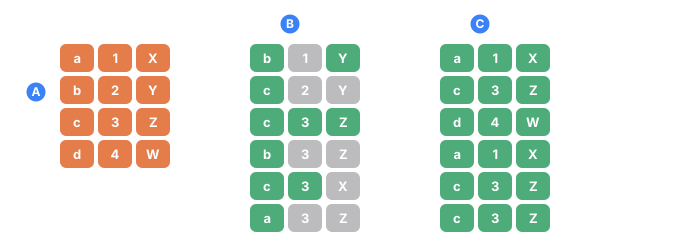
- Athe source file: four lines, three columns
- Bwithout row= every field picks its own line, so the record gets assembled from pieces that never belonged together (the gray cells)
- Cwith row= all three fields read the same line, so every record is a real line of the file
At a glance
| Attribute | Required | What it does |
|---|---|---|
src | yes | Where the file is — relative, @data, or absolute path |
column | no | Read one CSV column, by name or 1-based number (switches to CSV) |
delimiter | no | Cell separator for CSV mode — comma by default |
header | no | Skip the first line when a column is chosen by number |
row | no | Link several fields to the same CSV line (keeps a record whole) |
src — where the file is
src is required. It can be a plain path or a resolver source:
src | Resolves to |
|---|---|
src="names.txt" | Next to the .tdc config file |
src="@data/names.txt" | Searched in the folders passed via --data-path |
src="/absolute/path/names.txt" | An absolute path |
src="file:///absolute/path/names.txt" | The same file, written as a URL |
The file is read as UTF-8. If the path can't be resolved, rendering stops with an error instead of silently producing nothing.
Two modes — list or CSV
The same src reads a file in one of two modes, and the mode is decided not by src
but by whether column is present:
- without
column— the file is a plain list: each non-empty line is one value - with
column— the file is a CSV, and values come from the named column
List mode — one line, one value
Problem. You need a pool of cities, but hard-coding a long list into value="…"
is awkward to edit and impossible to reuse.
Tool. Put one value per line in a file — data/cities.txt:
Chicago
Austin
Denver
Boston
Seattle
<sequence name="City">
  <gen type="file" src="@data/cities.txt"/>
</sequence>
...
<data>${{City}}</data>
Pass the data folder at run time with --data-path:
./run example.tdc --data-path ./data
Result. Lines are chosen uniformly at random (with repeats — Denver came up
twice):
Denver
Chicago
Boston
Denver
Austin
Empty lines are skipped in list mode. A blank CELL in column mode is a different thing and is refused: skipping it would take the whole row out of the pool, so the file's own proportions would stop being the run's. Fill it in, remove the row, or point column= at a column that is complete. For strict file order instead of random
picks, add order="sequential" — it emits the lines in exactly the order they
appear in the file (see order= / cycle=).
order="sequential" walks the file and then wraps back to the first line, so a
count larger than the file repeats rows — silently, with no warning. For a list of
weekday names that is the point; for a file of real records it means duplicates in
your output that nothing draws attention to.
Add cycle="false" when running out of lines should stop the run rather than repeat
it. It names the row that ran out and writes nothing.
CSV mode — a value from a column
Problem. The file isn't a single column but a table, and you want just one
field — say only the email addresses. Let data/users.csv be:
first_name,last_name,email,city
John,Smith,john.smith@example.com,Austin
Mary,Johnson,mary.johnson@example.com,Denver
James,Williams,james.williams@example.com,Boston
Emma,Brown,emma.brown@example.com,Seattle
Tool. The same src, plus column — its mere
presence switches the generator into CSV mode:
<sequence name="Email">
  <gen type="file" src="@data/users.csv" column="email"/>
</sequence>
...
<data>${{Email}}</data>
Result. The first line is treated as the header and never appears in the
output; values come only from the email column:
john.smith@example.com
james.williams@example.com
john.smith@example.com
mary.johnson@example.com
john.smith@example.com
column — by name or number
The presence of column is what turns the file from a line-per-value list into a
CSV. Without it, the generator would take the whole line
(John,Smith,john.smith@example.com,Austin) as a single value. You can address the
column in two ways.
By name
Use a name from the header line. The header row is dropped automatically, and values start from the second line:
<gen type="file" src="@data/users.csv" column="email"/>
john.smith@example.com
james.williams@example.com
john.smith@example.com
mary.johnson@example.com
john.smith@example.com
By number (1-based)
Give a 1-based index instead of a name. column="2" is the second column
(last_name) — numbering starts at one, so the first column is column="1", never
column="0". When you address by number, TDC has no header names to recognize, so
add header="true" to skip the header line ("1" and
"0" are accepted for it too):
<gen type="file" src="@data/users.csv" column="2" header="true"/>
Johnson
Smith
Williams
Smith
Brown
The same file with column="3" reads the third column, email — identical data to
column="email", just addressed by position. It needs header="true" for the same
reason column="2" did: when a column is addressed by number, TDC has no header to
recognize, and without it the word email itself gets drawn as a value.
<gen type="file" src="@data/users.csv" column="3" header="true"/>
james.williams@example.com
john.smith@example.com
john.smith@example.com
mary.johnson@example.com
mary.johnson@example.com
Edge cases
column="0"is not a valid index (numbering starts at 1) — it's read as the literal name0, which isn't in the header, so you geterror[TDC062]: file generator: CSV column "0" was not found in the header row.- A number past the last column (
column="9"on a four-column file) fails witherror[TDC062]: file generator: CSV column "9" is past the last column — the file has 4. - If the file's separator isn't a comma, set
delimiter— otherwise the whole line lands in one cell and no column is found.
delimiter — how cells are separated
Problem. Not every table is comma-separated. Exports from spreadsheets often use a semicolon or a tab. Tell TDC nothing and it splits on commas, finds no cells, and treats the whole line as a single field — the column is never found.
delimiter takes either a single character (delimiter=";") or one of these
name aliases:
| Value | Separator |
|---|---|
comma | comma , (the default) |
semicolon | semicolon ; |
pipe | vertical bar |
tab | tab character (TSV files) |
\t | tab character (same as tab) |
For a TSV file (tab-separated columns), delimiter="tab" and delimiter="\t" are
equivalent — both read the tab as the separator.
Semicolon — the common case
Take the same users, but semicolon-separated — data/users_semicolon.csv:
first_name;last_name;email;city
John;Smith;john.smith@example.com;Austin
Mary;Johnson;mary.johnson@example.com;Denver
James;Williams;james.williams@example.com;Boston
Emma;Brown;emma.brown@example.com;Seattle
Without delimiter (comma is assumed) the whole line is one cell, so the
email column can't be found:
<gen type="file" src="@data/users_semicolon.csv" column="email"/>
error[TDC062]: file generator: CSV column "email" was not found in the header row
note: For CSV files, use a header name like column="email" or a 1-based index like column="2".
With delimiter="semicolon" (or delimiter=";") the cells split correctly:
<gen type="file" src="@data/users_semicolon.csv" column="email" delimiter="semicolon"/>
john.smith@example.com
james.williams@example.com
john.smith@example.com
mary.johnson@example.com
Pipe
A file whose columns are separated by | reads with delimiter="pipe":
<gen type="file" src="@data/users_pipe.csv" column="email" delimiter="pipe"/>
mary.johnson@example.com
mary.johnson@example.com
john.smith@example.com
Tab (TSV)
A tab-separated file reads with delimiter="tab" (or delimiter="\t"):
<gen type="file" src="@data/users.tsv" column="email" delimiter="tab"/>
john.smith@example.com
james.williams@example.com
john.smith@example.com
header — skip the header row for a numeric column
Problem. In a CSV the first line is usually a header (first_name,last_name,…).
When you pick a column by name, TDC knows the first line is the header and drops
it. But when you pick by number, there are no column names to recognize — TDC
can't tell a header from data, so by default it keeps everything, including the
header line, and junk like first_name leaks into the output.
header is true or false (default false). It only affects a numeric
column.
Without header — the header cell first_name is treated as an ordinary value
and shows up in the output:
<gen type="file" src="@data/users.csv" column="1"/>
John
John
first_name
Emma
first_name
With header="true" — the first line is dropped, leaving only real values:
<gen type="file" src="@data/users.csv" column="1" header="true"/>
Mary
John
James
John
Emma
When header isn't needed
For a column chosen by name (column="email"), you never need header="true":
a named column is always looked up in the first line, and data is read from the
second line on. header matters only for a numeric column.
row — keep a record together
Problem. Several fields need to come from the same CSV line. Without row,
each file generator picks independently, so a record falls apart — the first name
from one line, the last name from another, the city from a third.
row takes any non-empty key, e.g. row="user". Every type="file" generator that
shares the same row — with the same src, delimiter, and header mode — reads the
same line for each record. One line is chosen per record, and different column
values read different cells from it. A key over two different files is refused by check:
a link is one line of ONE file, so there is no line that belongs to both.
Without row — three independent generators, so the records don't line up
(Mary with Smith's last name, James in the wrong city):
<sequence name="User">
  <gen name="First" type="file" src="@data/users.csv" column="first_name"/>
  <gen name="Last"  type="file" src="@data/users.csv" column="last_name"/>
  <gen name="City"  type="file" src="@data/users.csv" column="city"/>
</sequence>
...
<data>${{User.First}} ${{User.Last}} — ${{User.City}}</data>
Mary Smith — Denver
John Williams — Austin
Emma Brown — Boston
James Johnson — Seattle
John Brown — Austin
With row="user" — all three fields come from one line, so every record is
coherent:
<sequence name="User">
  <gen name="First" type="file" src="@data/users.csv" column="first_name" row="user"/>
  <gen name="Last"  type="file" src="@data/users.csv" column="last_name"  row="user"/>
  <gen name="City"  type="file" src="@data/users.csv" column="city"       row="user"/>
</sequence>
Mary Johnson — Denver
James Williams — Boston
John Smith — Austin
John Smith — Austin
Emma Brown — Seattle
Now first_name, last_name, and city always come from one CSV line — the fields
can't drift apart. This works on any engine (the default is streaming, so memory
doesn't grow with the number of rows).
Weighted rows — row + weight
By default the linked row is chosen uniformly. Add
weight="column" to one field in the group and the
row is drawn by a weighted quota from that column (exact, like percent), while
the other fields still read from the same chosen line. That way an item shows up at
its real sales frequency, and its price and category come from its own row —
data/catalog.csv:
name,category,price,sales
Pen,Office,1.10,500
Coffee,Drinks,4.50,1200
Backpack,Bags,45.00,80
<sequence name="Item">
  <gen name="Name"  type="file" src="@data/catalog.csv" column="name"     row="i" weight="sales"/>
  <gen name="Price" type="file" src="@data/catalog.csv" column="price"    row="i"/>
  <gen name="Cat"   type="file" src="@data/catalog.csv" column="category" row="i"/>
</sequence>
...
<data>${{Item.Name}} | ${{Item.Cat}} | ${{Item.Price}}</data>
Coffee | Drinks | 4.50
Pen | Office | 1.10
Coffee | Drinks | 4.50
Engine note. Without weight, a linked group runs on any engine. With
weight, the config always runs on the in-memory engine: a streaming engine can't
weight the row choice without first knowing the file's totals. If you force
--engine 2, TDC says so plainly rather than silently emitting incoherent columns.
The cost is that memory then grows with count — see Which engine runs your
config. Linked groups
themselves are covered in Coherent & relational
data.
Limitations (v1)
rowworks only inside a<sequence>. The output block has no generators at all, so the question doesn't arise there.rowrequirescolumn— it's a CSV feature, and a plain text list has nothing to link.- The same
rowkey with different sources does not link them: TDC keeps a separate row group for each combination of source, delimiter, and header mode. This is not an error, just something to be aware of.
read="quantile" — a measured sample as a distribution
Everything above treats the file as a bag of values: pick one, put it in the
cell. That is exactly right when the values are countable — a city, a status, a
number of orders — and weight= even honours their shares to the row.
It is wrong for a measurement. A file of a thousand real transaction amounts, read as a bag, gives a thousand distinct amounts no matter how many rows you ask for. A million rows still hold a thousand values with nothing between them — a comb. Real money is not shaped like a comb, and a model trained on the output learns a structure the real data never had.
read="quantile" reads the same file the other way: sorted once, and treated as
a ruler. A row lands anywhere on it, and when it falls between two observations it
takes the value between them.
23.10
25.40
25.40
31.00
40.75
<sequence name="Amount"><gen type="file" src="amounts.txt" read="quantile"/></sequence>
Measured on a 951-value sample of transaction amounts, 100,000 rows:
| source | read="quantile" | ordinary pick | |
|---|---|---|---|
| 10th percentile | 25.25 | 25.13 | 25.12 |
| median | 53.30 | 52.98 | 53.64 |
| 99th percentile | 227.66 | 227.39 | 231.52 |
| distinct values | 951 | 15,083 | 951 |
Three things follow from reading a file this way, and each of them is the reason to prefer it for a measured quantity:
- The resolution follows the mass, not the range. A tail six orders of magnitude long costs no more points than a narrow hump, because the file's own density decides where the detail is.
- A repeated value stays an atom.
25.40twice in the sample above is a flat shelf on the ruler, so it keeps exactly its own share of the run while everything around it stays continuous. Discrete and continuous live in one file. - Nothing beyond the sample is invented. The generated range is exactly the observed one — a sample cannot support a claim about values it never saw.
The precision is decided by your file, not by a guess. Interpolating between
31 and 40 gives 35.4, which is right for money and wrong for a count of orders. So
the answer is written with as many decimal places as the source used: a
whole-number sample gives whole numbers, a sample written to the cent gives cents.
decimals overrides it when you want something else.
It reproduces the shape, not the share of any individual value. Interpolation
takes mass from the observed points and gives it to the values in between — that
is the whole cure for the comb, and it cannot be had without the trade. On a
sample of twenty integers, the value 46 (one of twenty, so 5% of the sample)
comes out in 0.4% of the rows; the rest went to 47, 48 and 49, which the sample
never saw but the continuum it stands for certainly contains.
What decides it is the DISTANCE to the next observation, not how often a value repeats. Measured on eight observations, every one of them appearing exactly once — four standing one apart and four far away:
10 → 12.500%   11 → 12.500%   12 → 12.500%   13 → 6.481%
40 → 0%        80 → 0%       160 → 0%       320 → 0%
Each owes 12.5%. The three with a neighbour on both sides keep all of it; 13
keeps half, because one side is dense and the other is a gap; the far four
dissolve into the values between them. A big atom survives for the same reason —
40% of the sample being exactly zero comes back as 39.997%, because its plateau
dwarfs the ramps at its edges.
So the check to run on your own file needs no generation at all:
- No gaps at the file's own step — whole numbers in a row, amounts to the cent in a row — and every share comes out exact. Measured on the integers 0…20 with no gap: worst deviation 0.0003 percentage points across all 21 values.
- Gaps — the shape is reproduced and an individual value's share spreads into the gap, the wider the gap the more.
And if the exact share of each listed value is the requirement, that is
weight= and its exact quota. The quantile read is
for the case where the sample stands for something continuous.
sample="exact" — reproduce the sample, without sampling noise
By default each row throws its own dice, so the shares wobble by the ordinary
amount any sample does. Add sample="exact" and no dice are thrown at all: row
i takes its own point on the ruler, and over the run the points cover it evenly.
<sequence name="Amount">
  <gen type="file" src="amounts.txt" read="quantile" sample="exact"/>
</sequence>
The same file and the same 100,000 rows, worst error across 99 percentiles:
| worst error | |
|---|---|
| drawn (default) | 0.600% |
sample="exact" | 0.024% |
and the remaining 0.024% is rounding to the cent, not sampling.
The column does not come out sorted — the points are scattered by the same
seeded permutation uniq uses — and the run
stays reproducible, streamable and parallel: all three engines produce the same
bytes, and --jobs 7 equals --jobs 1.
Which reading to use
| your column | file | what to write |
|---|---|---|
| countable (city, status, number of orders) | value,count | weight="count" — an exact quota |
| measured (money, weight, duration) | the raw sample, one per line | read="quantile", plus sample="exact" to remove the noise |
read="quantile" cannot be combined with weight=, row= or
order="sequential" — each of those is a different way of reading the same file,
and asking for two at once is TDC297.
See also
src,column,delimiter,header,row, andweightin the attribute reference.- Files & CSV — the end-to-end guide to loading external data.
- Coherent & relational data — linking whole records together and weighted rows.