Data Packs
A data pack is a self-describing file holding a list of values (first names, last names, colors, anything) that TDC picks up automatically and exposes at a short dotted address. You add new data without touching code — just drop a file into a data folder.
The example outputs below are illustrative: exact values can shift between core versions, but the shape and the proportions hold.
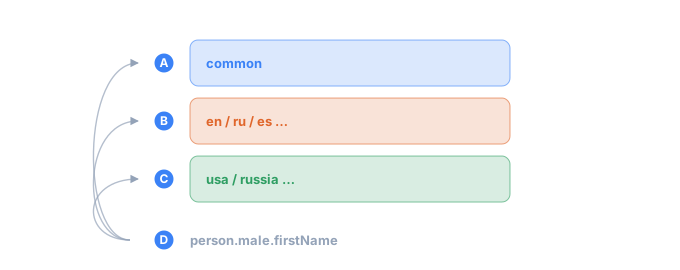
- Ainternational data, the same in every locale
- Bthe language axis: how names and words are spelled
- Cthe country axis: what's specific to a single country
- Done address — which bucket answers it depends on the run, not on the address itself
The rules
- One file = one homogeneous list = one address. Male and female first names are different lists, each in its own file.
- Data and declarative generators only — no executable code. A pack is either "take a value from a list" or a generator written in TDC's own DSL (see Writing your own). Nothing arbitrary runs, which is what keeps the cross-language guarantee intact and makes third-party packs safe to download.
- Plain UTF-8, one value per line. The extension doesn't matter (
.txt,.csv, or none at all).
How the address is formed
There are two ways, and they work together.
From the folder structure (default)
The address is the file's path relative to the data folder, without the extension:
data/packs/en/person/male/firstName.txt   →   en.person.male.firstName
data/packs/es/person/lastName.txt         →   es.person.lastName
Folder names become the dotted segments. Nothing to declare — the location is the address. Use this for anything that fits a tidy folder tree; it's the whole story for most packs.
One folder name is the exception: countries/ never becomes a segment. A file at
countries/usa/docs/ssn.txt is addressed usa.docs.ssn — country packs are addressed by
the country, and the folder is only there to keep the store tidy.
From a header (override)
If a file sits off on its own, or needs an address that doesn't match its folder, put
a header at the top, fenced by --- lines:
---
description: Color names
address: common.color.name
---
chrome
plasma-blue
void-black
TDC then uses address: instead of the path. The first segment must still be a locale
code, a country name, common or user. Use this when the address and the on-disk layout can't be the same —
a single shared file, a vendored third-party list, a generated pack.
Header fields
All header fields are optional. The ones that build or redirect the address are covered below; the fields that change how the body is read (weighted lists, external files, generators) get their own worked examples in Writing your own.
| Field | Meaning | Where covered |
|---|---|---|
description | A human-readable description — "what this is" | below |
address | An explicit address, overriding the one computed from the path | below |
locale | Which language the pack speaks (en, es, fr…) | below |
file | Point at an external data file instead of an inline body | below |
column | With file: take a named/numbered column from a CSV | below |
delimiter | The column/value separator (default ,) | below |
weight | Make the pack weighted: the frequency column | Writing your own |
weighted | true — the body is value,weight lines | Writing your own |
generator | tdc — the body is a <gen>, not a list | Writing your own |
inject | A custom interpolation marker for a generator | Writing your own |
description — metadata
Free text describing the pack. It has no effect on the output — it's there for humans, and for the editor autocomplete that reads it (see Editor support). Keep it short: "US city names", "HTTP status codes".
address: — override the computed path
address: replaces the path-derived address. The file below sits outside any matching
folder tree, yet still resolves at common.color.name:
---
address: common.color.name
---
chrome
plasma-blue
void-black
<gen type="template" value="common.color.name"/>
plasma-blue
void-black
chrome
plasma-blue
Reach for this when a file can't sit where its address says it should: a shared list, or a pack somebody else laid out.
locale: — which language the pack speaks
locale: tags the pack's language so locale-aware resolution can find it. The same
logical path resolves to different data per locale: person.lastName gives English
surnames under the default en, and es.person.lastName gives Spanish ones.
<gen type="template" value="person.lastName"/>
Smith
Johnson
Williams
Brown
<gen type="template" value="es.person.lastName"/>
Garcia
Fernandez
Rodriguez
Lopez
Set it when a pack's data is language-specific and its address doesn't already carry a
locale segment. See the template generator for how one
path maps across locales.
locale: also supplies the segment the path is missing. A file dropped straight
into your own folder — no locale tree above it — derives the address gadget, which
starts with no locale and so belongs nowhere. Its own header settles that:
---
description: my own list
locale: en
---
Blender
Grinder
<gen type="template" value="gadget"/>
The pack is registered at en.gadget, and value="gadget" under en finds it. So a
file lands at its address by one of three routes: address: if the header names one,
otherwise the path, and locale: fills in the locale when the path alone leaves the
address homeless. All three work identically in every implementation.
A file that ends up at none of them — a header, but no address:, no locale:, and a
path starting with no locale, country or common — is not addressable and is left out.
The CLI says so at load time with a TDC171 warning rather than letting it vanish.
A regional variant falls back to its base language
en-gb, pt-br and de-at are locales like any other, and most of them ship nothing of
their own. A run that names one gets its base language: local="en-gb" draws from en,
local="pt-br" from pt. Dates take the same step, so de-at reads März rather than
March.
That is what makes a variant pack cheap to write — it carries only what actually differs.
Drop a single en-gb/geo/city.txt in, and British cities win while every other address
still comes from en:
packs/
  en-gb/
    geo/
      city.txt      ← only this differs
The step is taken once, and never as far as English. That single step is why
Traditional Chinese is shipped as zh rather than as zh-tw: Taiwan, Hong Kong and
Macau write the same script, all three of zh-tw, zh-hk and zh-mo reach zh in one
step, and none of them would reach a pack named after any one of the others. zh-cn
ships a full pack of its own and never falls back, so zh is precisely the slot the
Traditional locales share. The date tables follow the same split — zh-cn writes a short
weekday 周日, the Traditional locales write 週日.
An external file as the body — file:, column:, delimiter:
Instead of an inline body, a header can point at an existing file — useful for large
lists, or for reusing a CSV you already have. file: is the path (relative to the pack
file), column: picks a column by name or number, and delimiter: sets the separator
(a character, or one of the aliases tab, semicolon, pipe).
---
description: US city names
file: ../../sources/us/cities.csv
column: name
delimiter: ,
---
<gen type="template" value="usa.city.name"/>
Springfield
Riverside
Franklin
Clinton
The pack has no inline values — the body is the named column of that CSV. The same three fields can also back a weighted list; that variant is covered in Writing your own.
Using an address
You call an address the way you call any template
generator. Pull the parts you want into named
sequences and assemble them in the .tdc:
<tdc>
    <env count="4" seed="demo">
        <sequence name="First"><gen type="template" value="person.male.firstName"/></sequence>
        <sequence name="Last"><gen type="template" value="person.lastName"/></sequence>
    </env>
    <block><line><data>${{First}} ${{Last}}</data></line></block>
</tdc>
Michael Johnson
Robert Brown
James Smith
John Williams
The address person.lastName is just the file en/person/lastName.txt in the data
folder, and calling a template generator on it hands back values from that list.
Compose the record shape yourself
The pack gives you the parts; the shape of the record is yours to build in the
.tdc. An English "First Last" and a Spanish "First Last1 Last2" are just two
arrangements of the same kind of pack:
<tdc>
    <env count="4" seed="es">
        <sequence name="First"><gen type="template" value="es.person.male.firstName"/></sequence>
        <sequence name="Last1"><gen type="template" value="es.person.lastName"/></sequence>
        <sequence name="Last2"><gen type="template" value="es.person.lastName"/></sequence>
    </env>
    <block><line><data>${{First}} ${{Last1}} ${{Last2}}</data></line></block>
</tdc>
Eduardo Restrepo Rosario
Ángel Suárez Vázquez
Cruz Salas Vásquez
Gilberto Ponce Barrios
The last row draws the same surname twice (Rodriguez Rodriguez): Last1 and
Last2 are two independent draws from one list, and nothing stops them from
colliding. When two fields in a row have to differ, wrap them in
<distinct> — the mechanics are covered in
Writing your own.
More than lists
A pack isn't limited to a flat list. It can also be:
- a weighted list — each value's real-world frequency, laid out exactly, with the
same Hamilton method as
percent; - a small generator written in the DSL — a
regexpattern, a name assembled from neighboring lists, or a<mix>that splits by exact percentage.
By convention, generator files use the .tdc extension and plain data stays .txt, so
the two are easy to tell apart. Both kinds are safe to ship and download — a generator
is a parsed, sandboxed DSL, never arbitrary code — and both are covered end to end in
Writing your own.
Where packs live
- The built-in set ships in the repo under
data/packs/and is scanned automatically on startup. - Your own folders are added with the CLI flag
--data-path <folder>(repeatable) or the library'sdataPaths. See Installing packs for thetdcv2 init/tdcv2 packflow.
Errors
Problems are caught at load time, before any generation runs:
- Two files claiming the same address →
TDC170, naming both files. Rename or move one. - A pack file that lands nowhere — a header, but nothing that gives it a locale,
country or
commonfirst segment →TDC171, a warning naming the file. Addaddress:orlocale:, or move it under a locale folder. - A typo in a path in the config (
value="person.male.firstNam") →TDC071,unknown template path.
TDC071: unknown template path 'person.male.firstNam'
did you mean 'person.male.firstName'?
Hidden files (anything starting with .) and README / LICENSE / CHANGELOG are
ignored by the scanner.
Address autocomplete in the editor is driven by those same description: headers, and
it ships — see Editor support.
Describing a folder
A folder of packs can say who wrote it, under what licence and at what version, by
carrying a _pack.json — see
Writing your own. Nothing in
it reaches the generated data; tdcv2 pack info reads it back.
See also
- Installing packs —
tdcv2 initandtdcv2 pack. - Writing your own — headers, generators, weighted packs.
- The
templategenerator — calling addresses and locale resolution.