Sequences
A <sequence> declares a named column of values, count rows long. Think of it as a
finished column that exists before rendering starts: the
generator fills every row, and as each output row is
rendered you pull a value out by name, either with
interpolation ${{Name}} or inside an if condition.
That is the logical model, and everything on this page follows from it. Whether the
column is really held in memory is a separate question the engine answers for you: the
default engine computes each value from its row number as the row streams past and never
holds the column at all, while mode="memory" and the object API do build the array. The
values are the same either way — see Large outputs.
Sequences live in <env>, right next to count and seed. The row layout (in
<block>) never generates anything itself — it only reads the columns your sequences
have already produced.
The example outputs below are illustrative: they show the shape of the result and can differ between core versions.
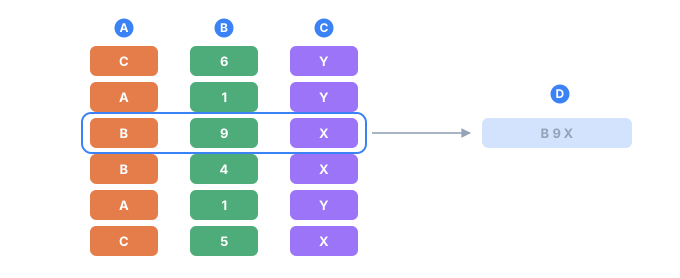
- Aone sequence — one column, filled independently
- Ba second sequence, which knows nothing about the first
- Ca third
- Done row: the same position taken from every column and assembled into a line of output
Attributes
| Attribute | Required | What it does |
|---|---|---|
name | yes | The sequence's name — how you reference it, e.g. ${{City}} |
parent | no | Restricts this sequence to a subset of rows. Syntax: Parent.Value |
comment | no | A free-text note; ignored by the engine |
Every sequence needs at least one <gen> child — that's
what produces the actual values.
A simple sequence
Use it when you need a single column you can reference by name from anywhere in
the layout. Declare it once in <env>, then read it with ${{City}}:
<tdc>
    <env count="5" seed="demo">
        <sequence name="City">
            <gen type="text" value="Austin,Denver,Boston"/>
        </sequence>
    </env>
    <block>
        <line><data>${{City}}</data></line>
    </block>
</tdc>
Denver
Austin
Boston
Denver
Boston
By default the values are picked randomly from the list, and the
seed fixes exactly which ones you get. For strict list order instead,
add order="sequential", described in Masks & case.
What makes a sequence "simple" is having exactly one unnamed <gen>. You read it as
${{SequenceName}}.
With proportions
The same one-column shape handles weighted picks. Give the
text generator a percent list and the values come out in
exact proportions:
<sequence name="Gender">
    <gen type="text" value="Male,Female" percent="60,40"/>
</sequence>
Over count=100 that gives you exactly 60 Male and 40 Female — percent is an
exact split across the run, not a per-row probability. See
Determinism & proportions for how it's enforced.
Male     60
Female   40
A composed sequence
Use it when one value is built out of several — a full name from a first name,
a space and a last name. Leave the <gen>s unnamed and put the literal text
between them:
<sequence name="FullName">
    <gen type="template" value="person.male.firstName"/>
    <data> </data>
    <gen type="template" value="person.lastName"/>
</sequence>
Robert Williams
James Johnson
John Smith
${{FullName}} is one value, so it goes into a card, a CSV column or a Parquet
column as it stands — there is nothing to join at the output.
Named and unnamed <gen>s can share one body. The unnamed ones build the
sequence's own value; a named one is a field beside it, reached as
${{Name.Field}} and contributing nothing to the concatenation.
A compound sequence
Use it when one entity has several related fields — first name, last name, age —
that belong together. Group them into a single sequence instead of three separate ones,
and give every <gen> a name:
<sequence name="Person">
    <gen name="FirstName" type="template" value="person.male.firstName"/>
    <gen name="LastName"  type="template" value="person.lastName"/>
    <gen name="Age"       type="number"   value="18..60"/>
</sequence>
Refer to the fields with a dot:
<line><data>${{Person.FirstName}} ${{Person.LastName}}, age ${{Person.Age}}</data></line>
James Anderson, age 34
Robert Williams, age 51
Michael Brown, age 27
A constant field
A <data> with a name is a constant field — and, unlike a one-value
generator, it costs no draw:
<sequence name="Row">
    <gen name="id"     type="increment" value="1"/>
    <data name="source">import-2026</data>
</sequence>
${{Row.source}} is import-2026 on every record.
<gen type="text" value="import-2026"/>It produces the same value and still takes one draw per row, so dropping it into
an existing config shifts every column declared after it. A named <data>
takes none, which makes it the only way to add a constant to a config someone is
already using.
Compound rules
- A
<gen>with anameis a field; one without is part of the sequence's own value (see a composed sequence above). A body where every<gen>is named is a compound and has no value of its own. - Field names must be unique within the sequence (error
TDC111on a duplicate). - All the fields share the same
parentfilter. If a parent is set, every field is filled in only on the matching rows and left empty on the rest. - A reference to a compound sequence without a field —
${{Person}}— is left in the output text as-is. That untouched placeholder is your hint that you meant${{Person.FieldName}}.
Fields in if conditions
Dotted names work inside conditions too, not just in ${{...}}:
<line if="Person.Age >= 18"><data>adult</data></line>
<line if="Person.Age < 18"><data>minor</data></line>
A conditional sequence
Use it when a column's value depends on another column. List several
<gen if="…"> branches; the first one whose condition is true wins. An unnamed
<gen> (no if) acts as the "else":
<sequence name="Age">
    <gen type="number" value="0..90"/>
</sequence>

<sequence name="AgeGroup">
    <gen if="Age < 18" type="text" value="Minor"/>
    <gen if="Age < 65" type="text" value="Adult"/>
    <gen               type="text" value="Senior"/>
</sequence>
Because the branches are tested top to bottom, Age < 65 only ever sees rows that
already failed Age < 18, so it effectively means "18–64". You read the result by
sequence name, ${{AgeGroup}}:
14  Minor
42  Adult
71  Senior
9   Minor
58  Adult
A conditional sequence is still a single column — you read it as ${{AgeGroup}}, just
like a simple one. The extra <gen> tags only decide which value fills each row.
Dependent sequences (parent)
A sequence can depend on another one with parent="Parent.Value". The child is computed
only on rows where the parent matches, and any percentages inside it are counted
against that subset rather than the whole count. This is the heart of TDC's
hierarchical model:
<sequence name="Gender">
    <gen type="text" value="Male,Female" percent="50,50"/>
</sequence>

<sequence name="MaleName" parent="Gender.Male">
    <gen type="template" value="person.male.firstName"/>
</sequence>

<sequence name="FemaleName" parent="Gender.Female">
    <gen type="template" value="person.female.firstName"/>
</sequence>
MaleName materializes only on rows where Gender == Male; on every other row it's
empty. The full treatment — nested percentages, multiple levels — is in
Hierarchical dependencies.
A compound sequence with parent
Compound sequences and parent work together with no special handling. Here each gender
gets its own grouped entity, and the male subset carries an extra Rank field:
<sequence name="Gender">
    <gen type="text" value="Male,Female" percent="50,50"/>
</sequence>

<sequence name="Male" parent="Gender.Male">
    <gen name="FirstName" type="template" value="person.male.firstName"/>
    <gen name="LastName"  type="template" value="person.lastName"/>
    <gen name="Rank"      type="text"     value="Private,Captain" percent="70,30"/>
</sequence>

<sequence name="Female" parent="Gender.Female">
    <gen name="FirstName" type="template" value="person.female.firstName"/>
    <gen name="LastName"  type="template" value="person.lastName"/>
</sequence>

<block>
    <line if="Gender == Male"><data>M: ${{Male.FirstName}} ${{Male.LastName}} (${{Male.Rank}})</data></line>
    <line if="Gender == Female"><data>F: ${{Female.FirstName}} ${{Female.LastName}}</data></line>
</block>
F: Mary Johnson
M: John Williams (Private)
F: Patricia Williams
F: Elizabeth Smith
M: James Johnson (Captain)
M: Robert Smith (Private)
What this guarantees:
- All three
Male.*fields materialize only on the male rows and stay empty on the female ones (and vice versa). Male.Rankis split70% Private, 30% Captainwithin the male subset — the percentages are measured against the number of men, not the totalcount.
Determinism & field order
The fields of a compound sequence are materialized in declaration order, and each
<gen> draws from the PRNG independently. That has one consequence
worth remembering:
Swapping two <gen name="…"> tags changes the output at the same seed. The first
field now drains a different slice of the random stream, so every field after it shifts
too.
<!-- These two produce DIFFERENT values at the same seed -->
<sequence name="Person">
    <gen name="FirstName" type="template" value="person.male.firstName"/>
    <gen name="Age"       type="number"   value="18..60"/>
</sequence>

<sequence name="Person">
    <gen name="Age"       type="number"   value="18..60"/>
    <gen name="FirstName" type="template" value="person.male.firstName"/>
</sequence>
If you need byte-identical output across runs, settle on a field order and leave it alone once you've committed to a seed. For more on what the seed does and doesn't guarantee, see Determinism & proportions.
Related value sources
Two other named sources live alongside <sequence> in <env>, and you read them with
${{Name}} the same way:
<mix>— a distribution by exact percent, where each branch can be a whole compound of literals and generators, not just a single value.<switch>— a deterministic key → value lookup table.
When all you need is one column of random or weighted values, <sequence> is the right
tool.
Next
- Generators — the
<gen>that produces a sequence's values. - Determinism & proportions — how
seed,count, andpercentfit together. - Hierarchical dependencies — the full
parentmodel.