Output & formatting
Once you've declared your data as sequences, the output block turns
it into text in whatever shape you want: CSV, JSON, SQL, a log line, a config file. It's
three nested tags — <block> → <line> → <data> — plus interpolation and a few
optional pieces (fixtures, filters, conditions).
The example outputs below are illustrative — the exact values can differ by core version and seed. What matters is the shape of each transformation, not the specific names or numbers.
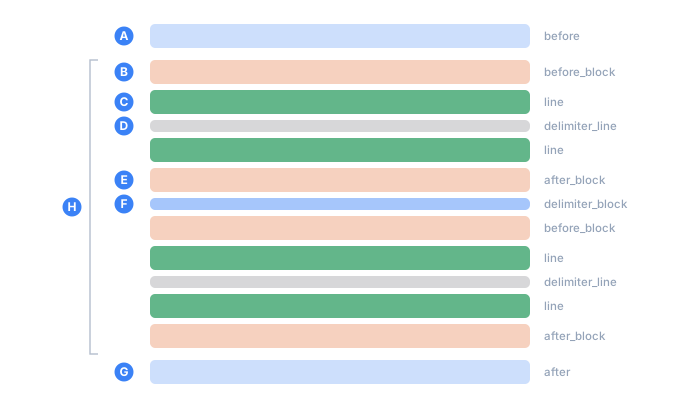
- Aprinted once, at the very start
- Bbefore every record
- Ca line of the record
- Dbetween the lines of one record — never after the last line
- Eafter every record
- Fbetween records — never after the last record
- Gprinted once, at the very end
- Heverything inside the bracket repeats once per record
The output block: <block> → <line> → <data>
<block>describes the layout of one record. The renderer repeats itcounttimes — once per record — substituting fresh sequence values on each pass.<line>is one line of output inside a record. Every<line>is followed by a newline.<data>holds raw text: everything between<data>and</data>is printed as-is, with one exception — interpolation${{…}}, which is replaced by sequence values.
A record can span several lines. You describe them once and the block repeats:
<tdc>
    <env count="2" seed="demo">
        <sequence name="Person">
            <gen name="Name" type="text" value="Alice,Bob,Carol"/>
            <gen name="Age" type="number" value="20..40"/>
        </sequence>
    </env>
    <block>
        <line><data>name=${{Person.Name}}</data></line>
        <line><data>age=${{Person.Age}}</data></line>
    </block>
</tdc>
name=Bob
age=30
name=Alice
age=28
The two-line block rendered twice (count="2") — two records of two lines apiece, each
with its own Name and Age.
<block> — the record layout
<block> is the one required child of <tdc>. It has no
attributes. Its only job is to hold the lines of a single record, which the renderer
repeats count times.
It holds <line>s, and <group>s
of them — several lines printed once per element of a list or pool, or kept and dropped
together by one condition. A stray tag directly inside <block> is an error, not a silent
skip — that catches a misplaced <gen> or a mistyped tag
before it corrupts your output:
error[TDC013]: <foo> is not allowed directly inside <block>
If <before_block> /
<after_block> /
<delimiter_block> are declared in <env>, they
wrap each rendered record — see Fixtures below.
<line> — one line of a record
<line> describes a single line inside a record. It's emitted once per pass, with a
trailing newline, and it holds any number of <data> children, printed one after
another from left to right.
if — show the whole line only on a condition
Problem. You want a --- separator between records, but not dangling after the
last one. Guard the whole line with if: when the expression is false, neither the line
nor its inter-line delimiter is emitted on that pass.
<tdc>
    <env count="3" seed="demo">
        <sequence name="Name">
            <gen type="text" value="Alice,Bob,Carol" order="sequential"/>
        </sequence>
    </env>
    <block>
        <line><data>name=${{Name}}</data></line>
        <line if="!_last"><data>---</data></line>
    </block>
</tdc>
name=Alice
---
name=Bob
---
name=Carol
The second line prints on every record except the last (_last is the built-in
"this is the final record" flag) — exactly the "between, but not at the end" behavior
you also get from the <delimiter_block> fixture.
The if expression uses the same small language as
<data if>: comparisons, !, &&, ||, and the built-in
names.
comment — a note that never renders
<line comment="…"> carries a free-form note for whoever maintains the config. It's
ignored at render time and never reaches the output. Use it to annotate a complicated
layout.
Generators don't live in <line>
The output block is for formatting only. You can't put a <gen> or a <mix>
directly in a <line> — declare a named <sequence> (or a
<mix>) in <env> and reference it with
${{Name}}. This keeps what the data is separate from how it's laid out.
There's a related limit: an advanced_regex
generator used from inside the output can't use the weighted-choice form (?%{...}),
because exact percentages need a sequence context with a known count. Declare it as a
named sequence in <env> instead.
<data> — raw text
<data> holds raw text. Everything between the opening <data> and its </data>
is printed verbatim, with a single exception: interpolation ${{…}} is replaced by
sequence values.
<data> is the only place you can freely write <, >, {, }, quotes, and
commas — the characters that are special to XML. That's what lets you assemble JSON,
CSV, SQL, or any other format built out of those characters:
<line><data><tag> = "value", {key: 42}</data></line>
<tag> = "value", {key: 42}Two things to know about the raw text:
- XML entities are not expanded.
<stays the literal<; it does not turn into<. Just write the character you actually want —checkwarns about an entity in<data>(TDC311), in case it got there out of habit. - In the layout,
<data>lives inside a<line>— either the block's lines or a fixture's — and nowhere else. Here it takes two optional attributes:if(suppress this piece on a condition) andpair(for a literal</data>in the text). The same tag has a second, unrelated job inside<env>: as a child of a<sequence>it is literal text glued into a composed value, and with anameit is a constant field. Layout or value — the surrounding tag decides.
Spaces are text too — indentation comes free
"Verbatim" includes spaces. Leading ones, trailing ones, and long runs in the middle all reach the output exactly as you typed them:
<line><data> hello </data><data>|end</data></line>
hello |end
Nothing is trimmed and nothing is collapsed, so you indent the output by indenting the
text inside <data>. That's the whole technique for producing structured, readable
files — an indented SQL schema, nested JSON, YAML, a tree.
Keep the two kinds of indentation straight. The indentation of the tags (<line>
sitting two spaces in) is your config's own layout, and it never shows up in the output.
Only what sits between <data> and </data> is text. In the schema below, the two
spaces before id are inside the data and survive; the four before <line> are outside
it and disappear:
<env count="2" seed="indent">
  <before>
    <line><data>CREATE TABLE customers (</data></line>
    <line><data>  id    INTEGER PRIMARY KEY,</data></line>
    <line><data>  name  TEXT NOT NULL,</data></line>
    <line><data>  city  TEXT NOT NULL</data></line>
    <line><data>);</data></line>
  </before>
  <sequence name="Id"><gen type="increment" value="1"/></sequence>
  <sequence name="Name"><gen type="template" value="person.male.firstName"/></sequence>
  <sequence name="City"><gen type="text" value="Paris,Berlin"/></sequence>
</env>
<block>
  <line><data>INSERT INTO customers VALUES (${{Id}}, '${{Name}}', '${{City}}');</data></line>
</block>
CREATE TABLE customers (
id    INTEGER PRIMARY KEY,
name  TEXT NOT NULL,
city  TEXT NOT NULL
);
INSERT INTO customers VALUES (1, 'James', 'Berlin');
INSERT INTO customers VALUES (2, 'John', 'Paris');
The extra spaces after id and name are doing alignment work — nothing lines the
columns up for you, you type the padding yourself. The same trick gives you indented
JSON: put { on one line and "id": ${{Id}}, on the next, and the nesting is
the spaces you wrote.
A <data> body is never trimmed; a comma-separated attribute list is. In
value="a, b" the second item is b, not " b" — the space around the comma is
separator padding, not data. So inside <data> the spaces are yours to control, and
inside a value= list they're cleaned up for you. The flip side of "never trimmed":
a trailing space you can't see is still in the file.
Interpolation — ${{Name}}
Inside <data>, ${{Name}} is replaced by that sequence's value on the current row.
<block>
    <line><data>Name: ${{Name}}, age: ${{Age}}</data></line>
</block>
Name: James, age: 72
Name: Mary, age: 18
Name: Andrew, age: 64
Name: Emma, age: 26
How a name resolves
For each ${{Name}}:
- A declared sequence with a value on this row → that value.
- A declared sequence with no value on this row (filtered out on this pass by a
parent) → the empty string. - An undeclared name (a typo, a forgotten declaration) → error
TDC193, with a suggestion:
error[TDC193]: "Nmae" is not a declared sequence — it would be printed literally
help: did you mean "Name"?
This check earns its keep in typed output. In a CSV you might spot a stray ${{Nmae}}
by eye, but in a Parquet file it would land in a typed string column and look like a
real value — you'd never catch it. If you genuinely want a literal ${{...}} in the
output (you're generating a config, a GitHub Actions file, a Handlebars template),
change the marker with inject and the check turns
off.
Built-in names
Always available without declaring anything: ${{_count}} (1-based record number),
${{_first}} / ${{_last}} ("true" / "false"), and ${{_total}} (the total). See
Built-ins.
Filters
You can transform a value in place with a | "pipe" — a mask, a case change, a slice,
and so on. This is formatting on the way out: the value is generated as usual, and
then the filter reshapes it. Here a raw nine-digit US SSN gets a display mask:
<data>${{Ssn}} -> ${{Ssn | mask:xxx-xx-xxxx}}</data>
407963258  ->  407-96-3258
539027461  ->  539-02-7461
Filters chain left to right (${{Name | mask:w:w | upper}} — mask, then uppercase).
The full set — mask, upper/lower/capitalize/title, slice, replace,
trim, group, compact, and the csv/sql escapes — is in
Masks & case.
Where interpolation does not run
- Not in attributes. Interpolation happens only in
<data>text, never inside a tag's attribute value. - No nesting. Interpolation is single-pass. If a sequence value itself contains
${{Something}}, that inner marker is not processed again — it goes out as-is.
Fixtures are the one place people expect it not to reach, and it does: see Fixtures below.
Conditional text with if
<data if="…"> prints only when the expression is true. If the condition is false, that
one <data> is suppressed for the row, and any other <data> in the same <line>
still renders normally. The classic use is "JSON without a trailing comma": a second
<data if="!_last">, prints a comma on every record but the last.
<tdc>
    <env count="3" seed="demo">
        <before><line><data>[</data></line></before>
        <after><line><data>]</data></line></after>
        <sequence name="Id"><gen type="increment" value="1"/></sequence>
    </env>
    <block>
        <line><data>  {"id": ${{Id}}}</data><data if="!_last">,</data></line>
    </block>
</tdc>
[
{"id": 1},
{"id": 2},
{"id": 3}
]
Two <data> tags in one <line> print back to back: the object, then the comma. On the
last record !_last is false, the comma is skipped, and the JSON stays valid. The
expression language supports comparisons (==, !=, <, >), the boolean operators
!, &&, and ||, and the built-in names — it's the same language
<line if> uses.
Fixtures — text around the records
Fixtures print fixed text at the edges of the run, which keeps the per-record <block>
clean:
<before>and<after>print once — before the first record and after the last. Typical uses: the opening[and closing]of a JSON array, a CSV header row, anINSERT INTO … VALUESprefix, a trailing;.<before_block>,<after_block>, and<delimiter_block>wrap each record. The last of the three prints between records but not after the final one.
All fixtures live inside <env> and, like the block, hold
<line> → <data>. The [ and ] in the JSON example above are a <before> and an
<after>:
<tdc>
    <env count="3" seed="demo">
        <before><line><data>[</data></line></before>
        <after><line><data>]</data></line></after>
        <sequence name="Id"><gen type="increment" value="1"/></sequence>
    </env>
    <block>
        <line><data>  ${{Id}}</data></line>
    </block>
</tdc>
[
1
2
3
]
The [ printed exactly once at the top and the ] exactly once at the bottom, whether
count is 3 or 3,000.
Two caveats, both enforced:
- Interpolation DOES run in fixtures. A
${{Name}}reads the row the fixture stands beside:<before>sees the first row,<after>the last, and the per-card and per-line fixtures the row they wrap. That is what lets a record put its own fields around a nested list. (This is one of the few behaviours the reference implementation had to be corrected on: it printed the braces literally while all four ports expanded them.) - Generators don't run in fixtures either. A
<gen>,<mix>, or<switch>inside a fixture is errorTDC131. This used to fail silently: avalue="500..999"generator in a fixture always emitted500, the low bound, which looked like a real value. - Conditions work in fixtures, and fixtures are checked. A
<line if="…">or a<data if="…">in a fixture reads the same row as its${{Name}}—<before>the first,<after>the last — so<before><line if="Mode == full">prints a header only when the first record asks for it.checkreads fixture lines the way it reads the block's: a misspelt name isTDC193, a condition that does not parse isTDC100. A<group>works in a fixture too, so a lookup table can be printed once, ahead of the records.
A custom interpolation marker
inject on <env> changes the
interpolation markers. The % is where the name goes, and it needs an opening and a
closing part around it — TDC splits the pattern at the rightmost % that leaves both
sides non-empty, which is what lets % itself appear in the wrapper:
<env inject="${{%}}">…</env>   <!-- the default -->
<env inject="[%]">…</env>       <!-- then write [Name] in <data> -->
<env inject="%{%}%">…</env>     <!-- split at the middle %: write %{Name}% -->
With inject="[%]" and <data>Name: [Name]</data>:
Name: James
Name: Mary
Name: Andrew
Name: Emma
Only the substitution syntax changes, not the data — the values are identical to the
default ${{Name}} form. The prefix and suffix are escaped for you, even when they
contain regex metacharacters. The main reason to change the marker is to emit a literal
${{...}} in your output (a config, a template) without tripping the undeclared-name
check.
Raw text and a literal </data>
<data> is raw, but a plain <data> closes at the first </data> it hits. To emit
a literal </data> in the text — a snippet of TDC syntax in generated documentation,
say — give the tag a pair marker; the opening and
closing tags both have to carry the same one. In the example below the ${{...}} is
meant to appear verbatim too, so it also moves the
interpolation marker out of the way with inject:
<env count="1" seed="demo" inject="[[%]]">
    <sequence name="Name"><gen type="text" value="a,b"/></sequence>
</env>
<block>
    <line><data pair="doc-example">To print a name, write: <data>${{Name}}</data></data pair="doc-example"></line>
</block>
To print a name, write: <data>${{Name}}</data>
The pair value has to be unique within the file. The parser now knows that only
</data pair="doc-example"> closes the block, so the inner </data> comes through as
plain text. (Without the inject="[[%]]", ${{Name}} would still be interpolated into
a value — pair protects the tags, not the substitution markers.)
See also
- Masks & case — the full set of filters and masks.
- Determinism & proportions —
seed,count, andpercent. - Hierarchical dependencies — how
parentfilters a sequence, giving the empty-string case above. - Built-ins —
_count,_first,_last,_total. - Tags reference —
<block>,<line>,<data>, and the fixtures at a glance.