Multiple values in a cell (repeat)
Use it when one field isn't always one value. An order has one item or five.
An article carries a single tag or four. A sensor reports three readings at once.
repeat makes a single <gen> emit several
values into one cell instead of one — and the count can vary from row to row.
Before repeat, the only way to fake a variable-length field was five separate
sequences with half the rows left blank. Now it's one attribute on the generator.
Example outputs below are illustrative — the exact values a given seed
produces can shift between core versions, but the structure each form
guarantees (how many values land in a cell, and how they're joined) does not.
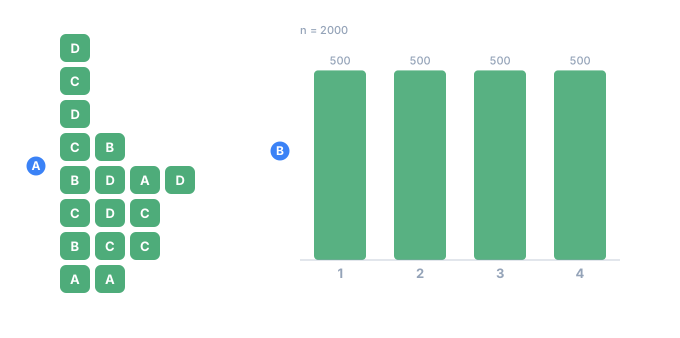
- Aone cell per row, holding between one and four values
- Bhow many rows came out with each length — the counts are an exact quota, not an approximation
At a glance
| Attribute | What it means |
|---|---|
repeat="3" | exactly three values |
repeat="1..5" | between one and five — every length gets an exact share of the rows |
repeat="0..3" | zero is allowed — the cell can come out empty |
separator=" " | what to join with; defaults to a comma |
The upper bound is 64. separator without repeat is an error — there's
nothing to join.
repeat="1..4" does not roll a die per row. TDC hands each length an exact
share of the run, the same way percent does — 200 rows
come out 50 / 50 / 50 / 50. When the count does not divide evenly the remainder goes
to one length and the seed decides which, so 201 rows come out
51 / 50 / 50 / 50 in some order. The lengths always sum to the count, which is what
keeps the value proportions exact too (below).
The price is the one every whole-run layout pays: change count and the lengths
are laid out again, so a short run is not the beginning of a long one. See
the whole-run exceptions.
repeat="1..5" — a varying count per row
This is the everyday case. An order line should hold however many items the order happened to have. Here each basket draws one to four SKUs, joined by spaces:
<env count="8" seed="basket-7">
    <sequence name="Id"><gen type="increment" value="1"/></sequence>
    <sequence name="Items">
        <gen type="regex" value="SKU-[0-9]{4}" repeat="1..4" separator=" "/>
    </sequence>
</env>
<block>
    <line><data>order ${{Id}}: ${{Items}}</data></line>
</block>
order 1: SKU-5365 SKU-2241 SKU-0758 SKU-9382
order 2: SKU-2033 SKU-3412 SKU-3799
order 3: SKU-3278
order 4: SKU-3984 SKU-4578
order 5: SKU-5351 SKU-5903
order 6: SKU-3412
order 7: SKU-0258 SKU-3326 SKU-1157
order 8: SKU-3205 SKU-4821 SKU-3618 SKU-2450
Basket size varies from one item to four, the way real orders do. Why: any field
whose real-world cardinality varies (order items, tags, phone numbers, addresses)
maps directly onto a min..max range.
repeat="3" — a fixed number of values
Give a single integer and every cell holds exactly that many values. Useful for fixed-shape tokens — a three-group code, an (x, y, z) triple, a set of three readings:
<sequence name="Code">
    <gen type="regex" value="[A-Z]{2}" repeat="3" separator="-"/>
</sequence>
QR-LM-ZP
BX-TT-KD
WM-AE-RH
NP-CC-JU
FL-GO-VS
DK-HY-QN
Why: when the shape is fixed and only the values vary, repeat="3" is
clearer than three separate fields glued together in the output block.
repeat="0..3" — zero is allowed
A range that starts at 0 lets a cell come out empty. That's exactly right
for an optional list — some articles have no tags at all:
<sequence name="Tags">
    <gen type="text" value="news,tech,sport,food,travel" repeat="0..2" separator=", "/>
</sequence>
article 1: tech, news
article 2:
article 3: sport
article 4:
article 5: travel, food
article 6: news
Articles 2 and 4 drew a length of zero, so their cells are blank — not a special
value, just an empty list. Why: "sometimes present, sometimes absent" is a
real data shape, and 0..n models it without a second sequence.
lengths= — how many rows get each count
Without it every length is equally likely, and "equally" here is exact rather than
approximate: the lengths are laid out as a quota, so repeat="0..5" gives each of the six
counts one sixth of the rows, with no sampling noise at all.
Real one-to-many data never looks like that. Orders per customer, visits per patient,
transactions per account: most parents have one or two children, a few have twenty.
lengths= gives the share of rows that get each count, lowest first:
<gen type="number" value="100..999" repeat="0..5" lengths="40,25,15,10,7,3" separator=";"/>
[896;648;701;334]
[]
[765]
[342;706]
[447;991;569]
[]
[148]
[]
Over 20,000 rows the shares come out to the hundredth, because they are a quota and not a draw:
0: 40.00% 1: 25.00% 2: 15.00% 3: 10.00% 4: 7.00% 5: 3.00%
One share per possible length, and they must sum to 100 — the same arithmetic percent=
uses. Five shares for six lengths is refused rather than repaired: a config written that way
had a shape in mind, and guessing which one was forgotten is not this engine's job.
lengths= is a quota: 40% means 40.00%. A shape drawn with
<gen type="pattern" mode="density"> reproduces a shape to
within a fraction of a percent, which is the right tool for "roughly like this" and the
wrong one for "exactly this many".
separator= — how the values are joined
Without separator, the values are joined with a comma. Set it to any string to
match the format you're building — a space, a pipe, " | ", "; ", whatever the
column needs.
<sequence name="Letters">
    <gen type="text" value="a,b,c,d,e" repeat="3"/>          <!-- default comma -->
</sequence>
<sequence name="Piped">
    <gen type="text" value="a,b,c,d,e" repeat="3" separator=" | "/>
</sequence>
d,a,c        d | a | c
b,e,b        b | e | b
a,c,e        a | c | e
Why: the joined cell is just text, so the separator is how you make it fit a CSV column, a JSON-ish inline list, or a human-readable line.
accumulate= — a running total across the list
The values in a cell are often steps of one thing rather than three unrelated draws: the
lines of a receipt, the legs of a trip, the minutes of a session. accumulate= replaces
the list with its running total.
<gen type="number" value="150..900" decimals="2" repeat="3" separator=", " accumulate="sum"/>
239.10, 568.84, 809.63
791.92, 1059.68, 1593.11
473.43, 785.34, 1006.51
The left column is the same generator without accumulate=; the right one is with it. The
last element is the total, and every element before it is the subtotal at that point.
accumulate= | Each element becomes |
|---|---|
sum | everything up to and including it, added up |
max | the largest value seen so far — a high-water mark |
min | the smallest so far |
пик 22,22,22,83,83
пик 11,48,54,54,54
пик 57,60,62,62,93
The arithmetic is exact, including decimals. The sum is computed on whole numbers
scaled by the widest fraction in the list, never on floating point — so 19.99 + 0.01 is
20.00 and not 20.000000000000004, and it is the same 20.00 in all five
implementations.
min and max return an element that already exists, so its own spelling survives. A
value drawn as 007 stays 007 rather than becoming 7.
An empty element is passed over. missing= blanks some
cells, and a blank one leaves the accumulator alone rather than counting as a zero — "no
reading that day" should not reset a meter.
accumulate= needs a list, so it needs repeat= (TDC237), and the operation is one of
those three (TDC238).
This accumulates inside one record. For a total that carries from row to row — an
account balance, a meter that only goes up — that is a different construct:
<gen type="running">.
Missing, anomalies, and formatting act per element
This is the one thing to remember: because repeat lives on the generator,
everything that generator does happens to each value separately, not to the
cell as a whole. Missing-data blanks, anomaly injection, and
output formatting all operate element by element.
The practical payoff shows up with a flag column. When a generator marks anomalies, its flag field becomes a list of the same length as the readings — one flag per reading, lined up exactly:
5,500,100     ->   false,true,true
800,200,1     ->   true,true,false
6,8,7         ->   false,false,false
100,300,900   ->   true,true,true
The flag sits precisely where the outlier is. That lets you test a detector exactly, instead of at the coarse "something in this batch was off" level — you know which reading broke.
If instead you want "the whole record is corrupt," that's a different job for a
different tool: a <mix> branch with a record-level flag, not repeat.
Word lists and exact proportions
The most common list is a set of tags, and repeat works straight on the
text generator:
<sequence name="Tags">
    <gen type="text" value="news,tech,sport,food,travel" repeat="1..3" separator=", "/>
</sequence>
article 1: [food]
article 2: [tech, news]
article 3: [news, tech, travel]
article 4: [sport, tech]
article 5: [travel, travel, news]
article 6: [sport]
Here's the subtle part. text lays its values out to
exact proportions via a percent list, not
approximate ones — and that guarantee survives repeat, for both a fixed
count and a range.
It works because TDC decides all the lengths first (also by an exact quota), and only then fills the resulting slots. Since the lengths are known up front, so is the total number of slots — nothing gets generated and thrown away, and no quota is lost.
Checked on 120,000 rows with repeat="1..4" and percent="40,30,20,10":
row lengths:   30000 x1    30000 x2    30000 x3    30000 x4     (exactly a quarter each)
values:       120000 news   90000 tech   60000 sport  30000 food   (exactly 40/30/20/10)
300,000 slots in total, and the distribution lands exactly. Run it with
--jobs 7 and you get the same numbers — the file is byte-for-byte identical.
[travel, travel, news] above is fine, not a bug. Each slot is filled
independently, so the same value can land twice — two readings of 40 or two of
the same item in a cart are normal data. When you need the opposite, say so with
distinct="true".
No repeats inside one cell: distinct
Sometimes a repeated value is wrong rather than merely uninteresting. A double
first name is the clearest case: Jesus Jesus Gonzales is not a name.
distinct="true" draws the row's values without replacement, so a cell
cannot hold the same value twice:
<gen name="First" type="template" value="person.male.firstName"
     repeat="2" separator=" " distinct="true"/>
William Robert Jones
Matthew Tyrone Smith
James Zachery Williams
Devin Jacob Brown
Thomas Preston Johnson
Side by side, the same five tags with and without it:
<gen name="Tags"   type="text" value="news,tech,sport,food,travel" repeat="1..3" separator=", "/>
<gen name="Unique" type="text" value="news,tech,sport,food,travel" repeat="1..3" separator=", " distinct="true"/>
tech   |   sport, tech, news
news, food, food   |   travel, tech
sport   |   news
news, travel   |   sport, travel
tech, travel   |   tech
sport, sport, tech   |   travel, news, food
food, food and sport, sport on the left; never on the right.
What it costs
distinct is not free, and the price is worth understanding before you reach
for it.
Without it, a listed column lays its values out across the whole run as an
exact quota — that is what makes percent land on the nose. A row that must not
repeat itself cannot read a pre-decided slot; it has to choose. So under
distinct the column draws per row instead, and its overall frequencies become
approximate rather than exact.
A weighted data pack still works and still leans on its frequent values — common first names stay common. It simply no longer lands on an exact count over the run.
That is why percent and distinct cannot both sit on one generator: percent
promises exactness the column can no longer deliver, so TDC refuses the pair
(TDC291) instead of quietly honouring one and
dropping the other. If you want proportions over list lengths, put them on a
<mix> or <switch> outside, with repeat
on the generator inside.
Everything else about repeat is unchanged: rows stay independent, so streaming
and --jobs keep working.
When it can't be done
Five values cannot yield six different ones. TDC says so rather than quietly handing back a shorter list:
| what you wrote | what happens |
|---|---|
distinct="true" with no repeat= | TDC290 — one value cannot repeat itself |
percent= and distinct= together | TDC291 — see above |
repeat="1..10" over a five-value list | TDC292, before the run — the list is in the config |
| the same, from a pack or a file | the same refusal, at run time — the pool is only known then |
The last row is the reason for the split. A value="a,b,c" list is countable
from the config, so tdcv2 check catches it; a pack file or a CSV column is
read while generating, so the refusal has to wait until then. Either way it is a
refusal, never a short cell.
The run-time refusal has a number behind it: the draw gives up after 64 tries at
finding another value the cell has not already used, and says so. A generator with more
than 64 values but a heavy skew — a regex that almost always produces the same string —
can hit that even though its pool is large enough on paper. check calls such a config
valid, because whether the pool is reachable is not knowable from the config.
Where repeat won't work
A few generators tie each value to the row number, and repeat can't apply
to them:
| Generator | Why not |
|---|---|
increment, decrement | the value depends on the row's position |
timeseries, pattern | same — the value is bound to the position |
For these, an element's index would depend on how long all the previous rows
turned out to be — a random quantity. That would make a row impossible to compute
without its neighbors, breaking streaming and --jobs. TDC refuses with a clear
error (TDC204) rather than silently doing the wrong thing.
What else TDC won't accept
| What you wrote | What it says |
|---|---|
repeat="many", repeat="1.5" | TDC195 — an integer is required |
repeat="-1", repeat="5..2" | TDC195 — the minimum can't be negative or above the maximum |
repeat="1..65" | TDC195 — the upper bound is 64 |
separator=";" without repeat | TDC198 — nothing to join |
repeat or separator on a <mix> | TDC196 — a mix picks one branch; it doesn't build a list |
On that last one: a <mix> chooses among branches, so "repeat it" has no
well-defined meaning. If you want a list inside a branch, put repeat on the
<gen> inside the <case>.
At scale
repeat doesn't get in the way of streaming or --jobs: a row is still computed
independently of its neighbors. Two separate things make that work, and they are
easy to mix up:
- The length of each row's list comes from the whole-run quota above. A row can look its length up from its own row number — no neighbour needed.
- The values are then drawn for the maximum (five, in the case of
repeat="1..5") and the extras discarded, so the draw position depends only on the row number and never on how long the previous rows turned out.
That's what lets a row be computed without computing the ones before it, and it's why multi-threaded output matches single-threaded byte for byte.
That's also where the cap of 64 comes from: a large repeat costs real work even
when the row ends up with only two elements. See
Large outputs.
In Parquet, a real list
When you export to Parquet, a repeat column becomes a true list, not a
joined string. The element type is inferred automatically:
id       INT64       REQUIRED
items    LIST of BYTE_ARRAY (UTF8)
prices   LIST of INT64
city     BYTE_ARRAY  REQUIRED
{"id":1,"items":["bread","cheese"],        "prices":[262],         "city":"Boston"}
{"id":3,"items":["cheese","milk"],         "prices":[469,241,188], "city":"Boston"}
{"id":6,"items":["milk","bread","coffee"], "prices":[81,262],      "city":"Denver"}
An empty list stays an empty list — it doesn't vanish. And a missing value inside
a list produces a real null in the element's place: in text that's
indistinguishable from an empty string, but Parquet records it exactly.
{"t":[6,5,null]}You can also set the type by hand: type="[]int64",
type="[]decimal(18,2)". Writing type="[]int64|null" means "a list whose
element may be null" — precisely what a per-element missing value produces.
See also
text— comma-separated lists and exactpercentproportions, whichrepeatpreserves.- Counters —
increment/decrement, the position-bound generatorsrepeatcan't apply to. - Masks & case — the per-element formatting that
applies to each value in a
repeatcell. - Large outputs — why
repeatstays streaming-safe and identical across--jobs.