The <mix> block
Use it when the shares in a column aren't equal and each share is more than
a single word. Real data is lopsided: most orders are paid and few are
canceled; most accounts are free and few are premium. You want a column
where the variants appear in fixed proportions — not split evenly, and not as
random noise.
<mix> is a distribution: a named source that lays its variants — the
<case> branches — across the rows in exact percentages.
Think of it as a <sequence> whose values are
spread by percent, except that each branch can be assembled from literals and
generators instead of being a single plain value. The layout is deterministic for
a given seed.
Example outputs below are illustrative — the exact values a given seed produces
can shift between core versions, but the counts that percent guarantees
never do.
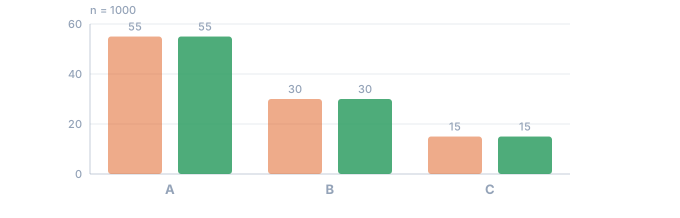
- the percentages written in the config
- the share that actually came out
A named distribution
<mix> sits directly in <env>, right
beside <sequence> — no wrapper needed, just a name. You read the value with
${{Name}}, exactly like any other named source:
<env count="100" seed="demo" inject="${{%}}">
    <mix name="Code" percent="25,70">
        <case><gen type="text" value="A"/></case>
        <case><gen type="text" value="B"/></case>
        <case><gen type="text" value="C"/></case>
    </mix>
</env>
<block>
    <line><data>${{Code}}</data></line>
</block>
The first few rows tell you nothing — proportions only show up across the whole sample:
A
B
A
B
B
A
Tally all 100 rows and the split is exact:
A   25
B   70
C    5
Exactly 25 / 70 / 5. The list sets the first two shares; the third branch takes
the remainder, 100 − 25 − 70 = 5. This isn't "about 25%" — it's an exact
layout by the Hamilton (largest-remainder) method, the same one that drives
percent on the text generator.
Change the shares, change the split
Same A/B/C branches, but percent="60,30":
<mix name="Code" percent="60,30">
    <case><gen type="text" value="A"/></case>
    <case><gen type="text" value="B"/></case>
    <case><gen type="text" value="C"/></case>
</mix>
A   60
B   30
C   10
60 / 30, and the leftover 10 goes to the third branch. One number in the list
re-cuts the whole column.
When you need <mix> — and when text is enough
For a plain distribution of ready-made strings, <mix> is overkill: the
text generator already does exact shares with
percent.
<sequence name="Gender">
    <gen type="text" value="Male,Female" percent="50,50"/>
</sequence>
Male     10
Female   10
<mix> earns its keep only when the branches are compound — when each variant
is assembled from its own combination of literal text and generators. That's the
case the next few sections build toward.
Attributes
| Attribute | Required | What it does |
|---|---|---|
name | yes | The name to interpolate with ${{Name}} |
percent | no | The share of each <case>; omit for a uniform split |
parent | no | A parent sequence — the split is computed inside its subset |
flag | no | Adds an answer-key column marking the outlier branch (see below) |
comment | no | A free-form note for the config author; never rendered |
A <mix> must contain at least one <case> — one
branch. Everything else is optional.
percent — optional, and partial
Leave percent off entirely and the branches split uniformly. Three cases
over 99 rows means 33 apiece:
<mix name="Bucket">
    <case><gen type="text" value="low"/></case>
    <case><gen type="text" value="mid"/></case>
    <case><gen type="text" value="high"/></case>
</mix>
low    33
mid    33
high   33
When you do supply one, it follows the same grammar as
percent on text: a number fixes that branch's share,
and the empty positions — a bare comma inside the list ("25,,70") or a
trailing comma ("25,70,") — divide what's left of 100 equally among themselves.
Both examples at the top of this page already rely on that rule: percent="25,70"
leaves the third branch to soak up the remainder.
count decides which rows get which branch
percent is a quota over the whole run, not a coin flip per row. That is a promise
worth having — ask for 15% and you get 15%, not "roughly, depending on luck". It also
has a consequence that surprises people the first time, so it is worth meeting here
rather than in your data.
<mix name="Temperature" percent="85">
    <case><gen type="number" value="-5..5" decimals="2"/></case>
    <case><gen type="number" value="[450..501],[650..701],[1000..1100]" decimals="2"/></case>
</mix>
Run it at count="10", then again at count="100", and compare the first ten rows:
count=10    -1.76  3.70    -0.44  0.96  499.88  0.21  2.18  2.20  -3.16  0.69
count=100   -1.76  468.42  -0.44  0.96  499.88  0.21  2.18  2.20  -3.16  0.69
Row two changed. Nothing else did — -1.76, -0.44, 0.96, 0.21, 2.18 and 0.69
are identical, and even the spike in row five stayed put. The values did not move; the
branch assignment did. Each row's number is keyed to that row, so it holds; what
changes is which branch the row was given.
The reason is arithmetic. At ten rows, 15% is one and a half rows, and a row cannot be split — so the quota comes out as one spike. At a hundred rows it is exactly fifteen. Different counts mean different numbers of spike rows, and the places for them come from a permutation over the whole run, so a longer run is a different permutation:
count | spike rows | 15% of count |
|---|---|---|
| 10 | 1 | 1.5 |
| 20 | 3 | 3.0 |
| 100 | 15 | 15.0 |
| 1000 | 150 | 150.0 |
If you need a row to stay the same when count changes, you want a per-row decision
instead — anomaly on the generator decides each row on its
own, so the first ten rows are identical at any run length. The trade is mirrored: the
share becomes approximate, and ten rows might carry one outlier or three.
So: <mix percent=> for an exact share, when you are producing a fixed dataset.
anomaly= for stable rows, when you are raising count to see what happens next.
parent — a distribution inside a subset
Give a <mix> a parent and the percentages are counted against the filtered
subset of rows, not the whole count — the same rule that governs a dependent
<sequence>. Here the paid accounts get a tier
breakdown; the free accounts leave the column empty:
<sequence name="Segment">
    <gen type="text" value="Free,Paid" percent="70,30"/>
</sequence>

<mix name="Tier" parent="Segment.Paid" percent="60,30">
    <case><gen type="text" value="Silver"/></case>
    <case><gen type="text" value="Gold"/></case>
    <case><gen type="text" value="Platinum"/></case>
</mix>
Over count="100", 30 rows are Paid. The 60 / 30 split is applied to those 30
rows, so Tier splits 18 / 9 / 3:
Silver     18
Gold        9
Platinum    3
18 + 9 + 3 = 30 — the whole paid subset, not a percentage of the full 100.
This is the heart of the hierarchical model; the full treatment, with nested
levels, is in
Hierarchical dependencies.
<mix> nests
A <case> can itself hold a nested <mix>, and the nested split is counted
against the rows that chose the outer branch — the same subset rule, one level
in. Here a third of all rows are error, and within those an inner <mix>
grades the severity:
<mix name="Status" percent="34,33">
    <case>
        <gen type="text" value="ok"/>
    </case>
    <case>
        <gen type="text" value="warn"/>
    </case>
    <case>
        <mix percent="70,20">
            <case><data>error/minor</data></case>
            <case><data>error/major</data></case>
            <case><data>error/fatal</data></case>
        </mix>
    </case>
</mix>
Over count="100" the outer split is 34 ok / 33 warn / 33 error. The inner
70 / 20 split then divides those 33 error rows into 23 / 7 / 3:
ok            34
warn          33
error/minor   23
error/major    7
error/fatal    3
23 + 7 + 3 = 33 — exactly the error subset.
The same holds one level out: a <mix> written inside a
<switch> branch takes its quota over the rows
that branch matched, not over the run.
A share smaller than one record
The subset rule has an edge worth knowing before it costs you an afternoon. A percentage is a share of the rows that reach the branch, not a chance rolled for each row. When that share works out to less than one whole row, the branch may produce a value and it may produce nothing at all.
This config gives every record a diagnosis. Ten percent of each sex gets a diagnosis specific to that sex, and the rest get a general one:
<env count="10" seed="demo" local="en">
    <sequence name="Gender">
        <gen type="text" value="Male,Female" percent="50,50"/>
    </sequence>
    <switch name="Diagnosis" on="Gender">
        <case is="Male">
            <mix percent="10,90">
                <case><gen type="template" value="medical.diagnosisMale"/></case>
                <case><gen type="template" value="medical.diagnosis"/></case>
            </mix>
        </case>
        <case is="Female">
            <mix percent="10,90">
                <case><gen type="template" value="medical.diagnosisFemale"/></case>
                <case><gen type="template" value="medical.diagnosis"/></case>
            </mix>
        </case>
    </switch>
</env>
Female,Coronary Artery Disease
Female,Tuberculosis
Male,Attention Deficit Hyperactivity Disorder
Male,Osteoarthritis
Male,Hypothyroidism
Male,Celiac Disease
Female,Anemia
Female,Postpartum Hemorrhage
Female,Tinnitus
Male,Obstructive Sleep Apnea
The female side worked: Postpartum Hemorrhage on row 8 comes from
medical.diagnosisFemale. The male side shows nothing from
medical.diagnosisMale — all five male rows carry general conditions.
The data is right, the config is right, and the split is right. Count the male rows: five. Ten percent of five rows is half a row.
percent="10" over a five-row subset asks for 0.5 records. TDC cannot emit half
a record, so it emits one or none, and the seed alone decides which. The run
above is not unlucky. Keep the config and change only the seed, and the
male-specific diagnosis appears in about half of the runs.
Whenever a share is small, multiply it by the number of rows that will actually reach it. Below 1, the column is a coin flip.
The coin is tossed once, when you choose the seed — not again on every run. The config above returns the same ten records forever, so a column that came out empty stays empty, and re-running it proves nothing. That is determinism working as promised, and it used to be what made the trap hard to spot: the output is stable, repeatable, and wrong about the share you asked for.
check says so now, before the run, and it does the arithmetic for you — once
per branch:
warning[TDC251]: percent="10" over 5 rows asks for 0.5 records — the result is 0 or 1, and the seed decides which
There is no gradual middle
The same config, one number changed, measured over 30 seeds each:
percent | Rows requested, out of 5 | Male-specific diagnoses produced |
|---|---|---|
5 | 0.25 | 0 under every seed |
9 | 0.45 | 0 under every seed |
10 | 0.5 | 0 or 1 — the seed decides |
11 | 0.55 | 1 under every seed |
16 | 0.8 | 1 under every seed |
20 | 1.0 | 1 under every seed |
Nothing fades in or out. Below 10% the branch never fires, above 10% it always fires exactly once, and 10% is the only value in the range that varies at all.
The reason is the allocation method. Each branch first takes the whole rows its
share covers, then the leftover rows go to the branches with the largest
fraction. At percent="11" the two shares are 0.55 and 4.45, so the one leftover
row goes to the first branch under every seed. At percent="9" they are 0.45 and
4.55, and it goes to the second under every seed. At exactly percent="10" both
fractions are 0.5, nothing separates them, and the tie is broken from the seed.
Two ways to make it certain
Raise the share so the fraction wins outright. One character changes:
<mix percent="20,80">
Female,Coronary Artery Disease
Female,Tuberculosis
Male,Attention Deficit Hyperactivity Disorder
Male,Spermatocele
Male,Hypothyroidism
Male,Celiac Disease
Female,Anemia
Female,Postpartum Hemorrhage
Female,Tinnitus
Male,Obstructive Sleep Apnea
Row 4 now carries Spermatocele. Nothing else in the column moved.
Or raise the count and keep the 10%. At count="20" the male subset holds ten
rows, and 10% of ten is exactly one:
Male,Osteoarthritis
Male,Hypothyroidism
Male,Obesity
Male,Vitamin D Deficiency
Male,Cryptorchidism
Male,Obstructive Sleep Apnea
Male,Varicose Veins
Male,Vitamin D Deficiency
Male,Attention Deficit Hyperactivity Disorder
Male,Cholecystitis
One Cryptorchidism in ten male rows, under every seed. Once the requested
number of rows is a whole number, the count is exact and the seed only decides
which rows get it.
Compound branches
Here's what <mix> gives you that a bare list of strings can't: a <case> can
assemble its value from several pieces — a literal <data>
fragment, one or more generators, and a nested
<mix>. In this context <data> is just a literal chunk of the value (glue
text), not output formatting — for that, see
Masks & case.
<mix name="Charge" percent="10,12,34,">
    <case><data>refund: </data><gen type="number" value="1..10"/></case>
    <case><data>chargeback: </data><gen type="number" value="11..20"/></case>
    <case><gen type="number" value="21..40"/></case>
    <case><gen type="number" value="41..100"/><data> (flagged)</data></case>
</mix>
36
refund: 4
chargeback: 18
66 (flagged)
refund: 8
refund: 1
73 (flagged)
82 (flagged)
Each branch built its own shape: refund: 4 is the literal refund: plus a
number in 1..10; 66 (flagged) is a number in
41..100 followed by the literal (flagged); the third branch is a bare number
with no wrapper at all. Fold the 100 rows by branch and the shares are still exact:
refund       10
chargeback   12
plain        34
flagged      44
10 / 12 / 34 / 44. The last branch has no percent of its own — the trailing comma
in percent="10,12,34," leaves it open, so it takes the remainder, 44.
A distribution generates — it doesn't format
<mix> produces data, so it lives only in <env>. You can't put it inside
the output block: a <mix> placed directly in a <line> is rejected before the
run with error TDC132, because the
output block is for layout only. Declare
<mix name="…"> in <env> and interpolate ${{Name}} where you want the value.
If you need a choice that isn't by percentage, two neighbors cover it:
<switch>picks by a key — a lookup table, likecountry → currency.- A
<sequence>with conditional<gen if="…">branches picks by an arbitrary condition — the first true branch wins.
Marking outliers with flag
A branch can be tagged as anomalous — <case anomaly="true"> — and flag makes
the mix emit an answer-key column alongside it. The result is a dataset you can
test an anomaly detector against: the outliers are present, and a companion
column records exactly which rows they landed on.
<mix name="Temp" percent="75,25" flag="Bad">
    <case><gen type="number" value="20..24"/></case>
    <case anomaly="true"><gen type="number" value="90..99"/></case>
</mix>
${{Bad}} reads true on precisely the rows that came from the tagged branch —
25% of them — and false everywhere else. The label is derived from the same
decision that picked the branch, so it can never disagree with the value.
anomaly="true" is only a label: the outlier itself is whatever the branch's
generator produces, which is why you keep full control over how it looks. This is
one corner of a larger topic — outlier injection and the flag column get their
own full treatment in the anomalies guide.
Next
- Text generator — exact
percentshares for a plain list of options, when the branches are single words. - Sequences — the named source
<mix>sits next to, and theparentmodel the two share. - Hierarchical dependencies — the
full
parentstory, with nested percentages across multiple levels.