Lists & iteration
list is the third value type in the compute language, alongside int and str. You
build one with <list>, walk it with
<each> or <reduce>, and turn
it back into a value with <join>,
<at>, or <length>.
Two rules shape everything on this page:
- A list can never leave
<compute>on its own. A sequence's value is a string, so a bare list has to be folded first — with<join>(to a string),<reduce>(to one value), or<at>(one element). This is why<each>almost always has a<join>or<reduce>wrapped around it. - A string iterates one character at a time. A
<field name="Base"/>holding"5120"walks as5, 1, 2, 0, and each single digit auto-converts to anintfor arithmetic. That is what makes checksums — which walk a value digit by digit — expressible here at all. Letters walk the same way:"abc"givesa, b, c.
Because every loop runs over a finite string or list, the language always terminates: there are no unbounded loops.
Where a list comes from
There are four sources, and only four. Every list on this page is one of them.
- Written out —
<list v="10,20,30"/>. - A string, walked by character — the
<over>slot accepts a string and stands in for the list of its characters. This is the one that surprises people: nothing in the config says "split", the<over>slot simply accepts a string. - The result of
<each>— a list in, a list out. - A string cut on a separator —
<split sep="|">, the inverse of<join>, and the way to read back a column thatrepeat=glued together.
All three in one config:
<tdc>
    <env count="1" seed="src" local="en">
        <sequence name="Code"><gen type="text" value="4816"/></sequence>

        <sequence name="FromLiteral">
            <compute><result><join sep="-"><in><list v="10,20,30"/></in></join></result></compute>
        </sequence>

        <sequence name="FromString">
            <compute><result><join sep="-"><in>
                <each><over><field name="Code"/></over><do><current/></do></each>
            </in></join></result></compute>
        </sequence>

        <sequence name="FromEach">
            <compute><result><join sep="-"><in>
                <each><over><list v="1,2,3"/></over><do><multiply><current/><int v="10"/></multiply></do></each>
            </in></join></result></compute>
        </sequence>
    </env>
    <block><line><data>literal: ${{FromLiteral}} | string: ${{FromString}} | each: ${{FromEach}}</data></line></block>
</tdc>
literal: 10-20-30 | string: 4-8-1-6 | each: 10-20-30
The middle one is the interesting column: Code is the string 4816, and <over>
handed <each> four separate characters.
| Tag | What it does |
|---|---|
<list> | a literal list: <list v="2,4,10"/> or built from children |
<each> | apply a body to each element → a new list |
<reduce> | fold a list into one value, through an accumulator |
<join> | a list → a string (attribute sep) |
<at> | one element by index (attribute default if out of range) |
<length> | the length of a string or a list |
Example outputs on this page are illustrative — the exact values depend on the seed and the core version — but each derived value is computed exactly from the input shown beside it.
<list> — a literal list of values
Takes v= with comma-separated integers, or child expressions → gives a list. Letters in v= are refused: <list v="a,b"/> fails with "a" is not an integer. For a list of words, build it from <str> children.
<list> is the list literal. It comes in two forms:
- Short form — comma-separated integers in the
vattribute:<list v="2,4,10"/>. Surrounding spaces are trimmed and empty pieces are dropped (" 2, ,4 "→2,4); a non-integer piece is an error. - Children form — a
<list>with nested expression tags collects their values:<list><int v="1"/><str v="a"/><field name="X"/></list>. This is how a list can hold strings, not just numbers.
Use the short form for a fixed lookup table (the weights of a checksum); use the children form to gather several fields or computed pieces before folding them.
From expressions → a string
The children form gathers two fields into a list, and <join>
renders it (the list itself can't be the result — only the joined string can):
<sequence name="A"><gen type="number" value="1..9"/></sequence>
<sequence name="B"><gen type="number" value="1..9"/></sequence>
<sequence name="Pair">
  <compute>
    <result>
      <join sep=",">
        <list>
          <field name="A"/>
          <field name="B"/>
        </list>
      </join>
    </result>
  </compute>
</sequence>
Each line is ${{Pair}}:
1,8
7,3
6,8
5,2
5,5
As a weight table
The short form is a fixed table shared by every row; <at>
pulls one element out by position:
<sequence name="Idx"><gen type="number" value="0..4"/></sequence>
<sequence name="Weight">
  <compute>
    <result>
      <at>
        <in><list v="7,3,1,9,5"/></in>
        <index><field name="Idx"/></index>
      </at>
    </result>
  </compute>
</sequence>
Each line is idx ${{Idx}} -> weight ${{Weight}}:
idx 1 -> weight 3
idx 0 -> weight 7
idx 0 -> weight 7
idx 3 -> weight 9
idx 1 -> weight 3
The list 7,3,1,9,5 is identical for every row; only the index changes.
<each> — map over a list
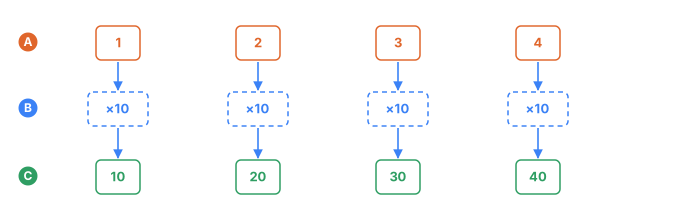
- Athe list <over> walks — one element per column
- Bthe <do> expression, the same one at every step, drawn dashed because it is one tag and not four
- Cthe list <each> gives back, in the same order
Takes the slots <over> (the list) and <do> (what to make of one element) → gives a list, not a string. That is why a <join> or a <reduce> almost always wraps it: putting the result straight into a string fails with cannot use a list where a string is expected.
<each> walks a collection, applies the <do> body to each element, and collects the
results into a new list of the same length — the "map" of the compute language.
- It takes two wrappers:
<over>(what to iterate over) and<do>(what to compute). A missing wrapper is a tree error (TDC187). - Inside
<do>,<current/>is the element and<current_index/>is its zero-based position. - The collection is a string (each element is a one-character string; a lone digit
auto-converts to an
intfor arithmetic) or a list. - The output is always a list, so before it leaves
<compute>you fold it with<reduce>or render it with<join>.
<each> takes no attributes — everything is set by <over> and <do>.
Shift every digit
Add one to each digit and take it mod 10 (so 9 wraps to 0), then glue the digits back
with <join>:
<sequence name="Pin"><gen type="number" value="1000..9999"/></sequence>
<sequence name="Shift">
  <compute>
    <result>
      <join sep="">
        <each>
          <over><field name="Pin"/></over>
          <do><mod><add><current/><int v="1"/></add><int v="10"/></mod></do>
        </each>
      </join>
    </result>
  </compute>
</sequence>
Each line is ${{Pin}} -> ${{Shift}}:
3115 -> 4226
9917 -> 0028
5120 -> 6231
5815 -> 6926
9444 -> 0555
Pin iterates character by character: each digit is a one-character string, so
<add> accepts it without <to_number>. <mod> with 10 keeps the
result a single digit. <each> yields the list of shifted digits, and <join sep="">
concatenates them with no separator.
Tag each element with its index
Inside <do>, <current_index/> gives the element's position. Build index:char pieces
and join them with a space:
<sequence name="Base"><gen type="number" value="100..900"/></sequence>
<sequence name="Labeled">
  <compute>
    <result>
      <join sep=" ">
        <each>
          <over><field name="Base"/></over>
          <do><concat><current_index/><str v=":"/><current/></concat></do>
        </each>
      </join>
    </result>
  </compute>
</sequence>
Each line is ${{Base}} -> ${{Labeled}}:
541 -> 0:5 1:4 2:1
436 -> 0:4 1:3 2:6
567 -> 0:5 1:6 2:7
214 -> 0:2 1:1 2:4
597 -> 0:5 1:9 2:7
Use it when you need a per-element transform — shift or mask each digit, encode each
character with <encode>, or build the list of terms a checksum will
later sum.
<reduce> — fold to one value
Takes the slots <over>, <init> and <do> → gives one value.
The four parts, as a piggy bank
You walk along a list holding a jar. At each step you look at the item in your hand and decide what goes into the jar. When the list ends, the jar is the answer.
| Tag | The jar version | What it holds |
|---|---|---|
<init> | what is in the jar before you start | the starting value |
<over> | the shelf you walk along | the list or string |
<do> | what you do at each step | an expression, evaluated once per element |
<acc> | what is in the jar right now | the value <do> produced last time |
<current> | the item in your hand | the element at this step |
<current_index> | which step this is, counting from 0 | a number |
<over>, <init> and <do> are slots: three different jobs, so three different names.
Their order in the file does not matter, but leaving one out does — all three are
required.
Step by step
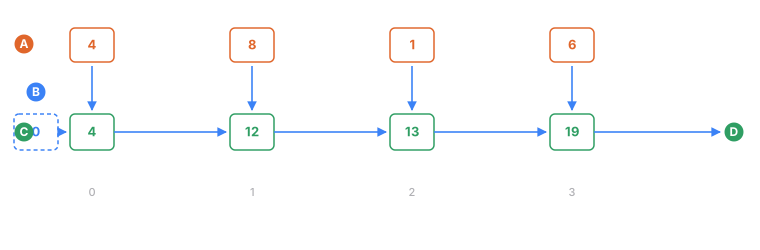
- Athe characters <over> walks, one per step, numbered from 0 underneath
- Bwhat <init> puts in the jar before the first step, drawn dashed because it is a starting value and not a step
- Cthe jar after each step — this is what <acc/> reads on the next one
- Dthe jar after the last step, which is what <reduce> gives back
Summing the digits of 4816:
<tdc>
    <env count="1" seed="r" local="en">
        <sequence name="Code"><gen type="text" value="4816"/></sequence>
        <sequence name="Sum">
            <compute>
                <result>
                    <reduce>
                        <over><field name="Code"/></over>
                        <init><int v="0"/></init>
                        <do><add><acc/><current/></add></do>
                    </reduce>
                </result>
            </compute>
        </sequence>
    </env>
    <block><line><data>${{Code}} → ${{Sum}}</data></line></block>
</tdc>
4816 → 19
Four steps, one row each. acc before a step is whatever the previous step returned;
<init> supplies the very first one.
| Step | <current_index/> | <current/> | <acc/> before | <do> computes | <acc/> after |
|---|---|---|---|---|---|
| 1 | 0 | 4 | 0 | 0 + 4 | 4 |
| 2 | 1 | 8 | 4 | 4 + 8 | 12 |
| 3 | 2 | 1 | 12 | 12 + 1 | 13 |
| 4 | 3 | 6 | 13 | 13 + 6 | 19 |
The jar after the last step — 19 — is what <reduce> gives back.
<reduce> walks a collection and folds it into a single value: it seeds an accumulator,
then recomputes it for every element. Unlike <each>, which
returns a list, <reduce> produces one value (an int or a str) that can come
straight out of <compute>. This is how checksums are built — a Luhn card digit, a
weighted mod-11 ID digit, an IBAN mod-97.
- It takes three wrappers:
<over>(the collection),<init>(the accumulator's starting value), and<do>(the per-element body). A missing wrapper is a tree error (TDC187). - Inside
<do>you get<acc/>(what's accumulated so far),<current/>(the element), and<current_index/>(its zero-based position). - The collection is a string (walked character by character; a lone digit auto-converts) or a list.
- The accumulator isn't limited to a sum — it can hold a maximum, a product, even a string.
It's whatever you put back into
<acc/>each step.
<reduce> takes no attributes — everything is set by <over>, <init>, and <do>.
Sum the digits
The most common case: start at 0, add each digit to the accumulator:
<sequence name="Pin"><gen type="number" value="1000..9999"/></sequence>
<sequence name="DigitSum">
  <compute>
    <result>
      <reduce>
        <over><field name="Pin"/></over>
        <init><int v="0"/></init>
        <do><add><acc/><current/></add></do>
      </reduce>
    </result>
  </compute>
</sequence>
Each line is ${{Pin}} -> sum ${{DigitSum}}:
3115 -> sum 10
9917 -> sum 26
5120 -> sum 8
5815 -> sum 19
9444 -> sum 21
3 + 1 + 1 + 5 = 10, 9 + 9 + 1 + 7 = 26. Each digit arrives as a one-character string
and auto-converts to a number, so no <to_number> is needed.
A weighted check digit
This is the classic case, and the pattern that finishes off many account and national-ID
numbers. Each position has its own weight; pull the weight by index with
<at>, multiply it by the digit, sum everything, then turn the
sum into a check digit with a double <mod> (% 11, then % 10) and
<concat> it onto the base:
<sequence name="Base"><gen type="number" value="100000000..999999999"/></sequence>
<sequence name="Account">
  <compute>
    <let name="check">
      <mod><mod>
        <reduce>
          <over><field name="Base"/></over>
          <init><int v="0"/></init>
          <do><add><acc/><multiply><current/>
            <at><in><list v="2,4,10,3,5,9,4,6,8"/></in><index><current_index/></index></at>
          </multiply></add></do>
        </reduce>
        <int v="11"/></mod><int v="10"/></mod>
    </let>
    <result><concat><field name="Base"/><use name="check"/></concat></result>
  </compute>
</sequence>
Each line is ${{Base}} -> ${{Account}}:
596215738 -> 5962157388
478374300 -> 4783743000
625770577 -> 6257705772
228098087 -> 2280980875
659123186 -> 6591231869
<reduce> accumulates the weighted sum: <current_index/> selects the weight from
2,4,10,…, <multiply> scales the digit, and <add> folds it into <acc/>. The sum
becomes a check digit, and <concat> appends it to the base — a correct ten-digit number.
An accumulator that isn't a sum
The accumulator holds the largest digit seen so far; each step uses
<choose> to keep whichever is greater, the digit or the accumulator:
<sequence name="Pin"><gen type="number" value="1000..9999"/></sequence>
<sequence name="MaxDigit">
  <compute>
    <result>
      <reduce>
        <over><field name="Pin"/></over>
        <init><int v="0"/></init>
        <do>
          <choose>
            <when><test><greater_than><current/><acc/></greater_than></test>
                  <then><current/></then></when>
            <otherwise><acc/></otherwise>
          </choose>
        </do>
      </reduce>
    </result>
  </compute>
</sequence>
Each line is ${{Pin}} -> max ${{MaxDigit}}:
3115 -> max 5
9917 -> max 9
5120 -> max 5
5815 -> max 8
9444 -> max 9
Starting at 0 works because digits are non-negative. Each step compares <current/>
against <acc/> and keeps the larger — proof that <reduce> does more than add things
up.
Use it when you need a single value out of a list: a checksum, a total, a product, a
running max or min. When you want a list of results instead, reach for
<each>.
<join> — a list to a string
Takes the slot <in> (the list) plus sep= → gives a string. With no sep= the elements are glued with nothing between them.
<join> turns a list into a string: it renders each element to text and connects
them with the sep separator. It's the main way to get a list out of <compute> — a
bare list can't become a sequence value, but after <join> it's an ordinary string. It
usually sits right after <each>.
- Each element is rendered to text: a number becomes its decimal form, a string stays as is.
- The input must be a list — a lone number or string is an error.
| Attribute | Required | Default | What it sets |
|---|---|---|---|
sep | no | "" (empty) | the separator placed between elements |
Build a compound value
Put three numbers in a <list> and join them with dots
to form major.minor.patch. The field values are strings, so wrap them in
<to_number> to make the list numeric:
<sequence name="A"><gen type="number" value="10..99"/></sequence>
<sequence name="B"><gen type="number" value="10..99"/></sequence>
<sequence name="C"><gen type="number" value="10..99"/></sequence>
<sequence name="Ver">
  <compute>
    <result>
      <join sep=".">
        <list>
          <to_number><field name="A"/></to_number>
          <to_number><field name="B"/></to_number>
          <to_number><field name="C"/></to_number>
        </list>
      </join>
    </result>
  </compute>
</sequence>
Each line is ${{Ver}}:
10.83.55
73.32.50
67.82.98
59.29.97
56.58.26
Space out digits (<join> after <each>)
The common pair: <each> turns a string into the list of its
characters, and <join> reassembles them — now with a separator:
<sequence name="Card"><gen type="number" value="10000000..99999999"/></sequence>
<sequence name="Spaced">
  <compute>
    <result>
      <join sep=" ">
        <each>
          <over><field name="Card"/></over>
          <do><current/></do>
        </each>
      </join>
    </result>
  </compute>
</sequence>
Each line is ${{Card}} -> ${{Spaced}}:
76899955 -> 7 6 8 9 9 9 5 5
96915004 -> 9 6 9 1 5 0 0 4
71643027 -> 7 1 6 4 3 0 2 7
27885493 -> 2 7 8 8 5 4 9 3
46564820 -> 4 6 5 6 4 8 2 0
Use it when you're getting a list out of <compute> (almost always after <each>), or
assembling a compound value — a version, a path, coordinates. For fixed right-to-left
grouping of a single string, <group> is simpler; <join> works on list
elements.
<split> — a string to a list
Takes the slot to cut plus sep= → gives a list of strings.
The exact inverse of <join>, and the fourth source of a
list. It exists for one shape in particular: a column built with
repeat= arrives as its elements glued into a single string,
and until <split> there was no way to read them back apart. "Sum quantity × price over the
lines of this order" could not be written at all unless the two lists happened to be the same
length.
| Attribute | Required | Default | What it sets |
|---|---|---|---|
sep | yes | — | the separator to cut on |
- The pieces are strings, like every other piece of text in this layer. Wrap one in
<to_number>to do arithmetic with it. sep=is one separator, not a set of characters:sep=", "cuts on comma-space.- An empty piece is kept.
a||cis three elements with a blank in the middle — dropping it would slide every later element into the wrong position. - A separator that does not occur gives the whole string as one piece.
sep=""is refused. Walking a string character by character is what<over>does with a plain string, and an empty separator would have to mean the same thing — spelled a second way, differently in each language.
Σ quantity × price over the lines of one order
<sequence name="Qty"><gen type="number" value="1..5" repeat="3" separator="|"/></sequence>
<sequence name="Price"><gen type="number" value="10..99" repeat="3" separator="|"/></sequence>
<sequence name="Total">
    <compute><result>
        <reduce>
            <over><split sep="|"><field name="Qty"/></split></over>
            <init><int v="0"/></init>
            <do>
                <add>
                    <acc/>
                    <multiply>
                        <to_number><current/></to_number>
                        <to_number>
                            <at>
                                <in><split sep="|"><field name="Price"/></split></in>
                                <index><current_index/></index>
                            </at>
                        </to_number>
                    </multiply>
                </add>
            </do>
        </reduce>
    </result></compute>
</sequence>
5|1|1 @ 22|14|77 -> 201
4|3|3 @ 58|91|62 -> 691
2|5|2 @ 42|13|72 -> 293
<current_index/> is what pairs the two lists: element k of the quantities multiplies
element k of the prices.
Counting and indexing
<sequence name="Tags"><gen type="text" value="red;green;blue"/></sequence>
<sequence name="Count">
    <compute><result><length><split sep=";"><field name="Tags"/></split></length></result></compute>
</sequence>
<sequence name="Second">
    <compute><result><at>
        <in><split sep=";"><field name="Tags"/></split></in>
        <index><int v="1"/></index>
    </at></result></compute>
</sequence>
3 tags, the second is "green"
<at> — index into a list
Takes the slots <in> (the list) and <index> (a number, counting from 0) → gives one element. An index past the end is an error unless a default is set.
<at> pulls one element out of a list by its zero-based position. It's ideal for
lookup tables: an index in, a finished value out (a checksum weight, a region name,
a tax rate).
- It takes two wrappers:
<in>(which list) and<index>(which position). A missing wrapper is a tree error (TDC187). - The index is coerced to an
int: a one-character digit string (a field holding"3") works as is; wrap a multi-digit string in<to_number>first. <in>must be a list (<list>or the result of<each>).- Out of range: if the
defaultattribute is set, it's returned; withoutdefault, it's an error. That's how a table gets a fallback value — butdefaultis always read as an integer, including over a list of<str>.default="Unknown"passescheckand then stops the run mid-way complaining about<to_number>, a tag the config never wrote. For a string fallback, wrap the<at>in a<choose>that tests the index instead.
| Attribute | Required | Default | What it sets |
|---|---|---|---|
default | no | — | the integer returned when the index is out of range |
A lookup table
A list of names and an index from a field. Idx is a single digit 0..4, so it needs no
<to_number>:
<sequence name="Idx"><gen type="number" value="0..4"/></sequence>
<sequence name="City">
  <compute>
    <result>
      <at>
        <in><list>
          <str v="New York"/>
          <str v="Chicago"/>
          <str v="Houston"/>
          <str v="Phoenix"/>
          <str v="Denver"/>
        </list></in>
        <index><field name="Idx"/></index>
      </at>
    </result>
  </compute>
</sequence>
Each line is ${{Idx}} -> ${{City}}:
1 -> Chicago
0 -> New York
0 -> New York
3 -> Phoenix
1 -> Chicago
The list of strings is built with the children form of
<list>, and <at> returns the element at Idx —
a substitution table in a handful of lines.
A fallback for out-of-range access
The list has three prices (positions 0..2), but the index comes from 0..6. For 3..6
there's no element, so default="0" kicks in:
<sequence name="Idx"><gen type="number" value="0..6"/></sequence>
<sequence name="Price">
  <compute>
    <result>
      <at default="0">
        <in><list v="100,200,300"/></in>
        <index><field name="Idx"/></index>
      </at>
    </result>
  </compute>
</sequence>
Each line is idx ${{Idx}} -> ${{Price}}:
idx 2 -> 300
idx 0 -> 100
idx 0 -> 100
idx 4 -> 0
idx 1 -> 200
idx 1 -> 200
Indexes 0..2 hit a price; idx 4 is past the end, so instead of raising an error it
returns default — here, 0. Without default, that row would fail at generation time.
Use it when you need a lookup table (a checksum weight by position, a code, a rate by
tier) or safe indexed access where default replaces "no such element" with a sensible
value.
<length> — measure a string or list
Takes one string or list → gives a number: characters in a string, elements in a list. It counts characters, not bytes — 👍ab is 3.
<length> returns a length — the number of characters if its child is a string, the
number of elements if its child is a list. The result is always an int, so you can keep
computing with it: compare it, divide by it, pad to it.
<length>STRING</length>— the count of characters (code points) in the string.<length>LIST</length>— the count of elements in the list (for example, the result of<each>).- The input must be a string or a list — a number is an error.
<length> takes no attributes — it measures its single child.
Characters in a string
The field value is a string, and <length> counts its characters:
<sequence name="City"><gen type="text" value="Reno,Boston,Ada,Sacramento,Chicago"/></sequence>
<sequence name="Len">
  <compute>
    <result>
      <length><field name="City"/></length>
    </result>
  </compute>
</sequence>
Each line is ${{City}} -> ${{Len}} letters:
Boston     -> 6 letters
Reno       -> 4 letters
Ada        -> 3 letters
Sacramento -> 10 letters
Chicago    -> 7 letters
Each character is one code point, so Sacramento gives 10.
Length as a denominator
A realistic case: divide the digit sum from <reduce> by the
digit count — <length> supplies the denominator. <divide> is integer
division (rounding down):
<sequence name="Pin"><gen type="number" value="1000..9999"/></sequence>
<sequence name="Avg">
  <compute>
    <result>
      <divide>
        <reduce>
          <over><field name="Pin"/></over>
          <init><int v="0"/></init>
          <do><add><acc/><current/></add></do>
        </reduce>
        <length><field name="Pin"/></length>
      </divide>
    </result>
  </compute>
</sequence>
Each line is ${{Pin}} -> avg ${{Avg}}:
3115 -> avg 2
9917 -> avg 6
5120 -> avg 2
5815 -> avg 4
9444 -> avg 5
For 3115: sum 10, length 4, 10 / 4 = 2 (the fractional part is dropped).
Elements in a list
<length> measures lists too. <each> turns a string into the
list of its characters, and <length> counts how many it produced:
<sequence name="Num"><gen type="number" value="[1..9],[10..99],[1000..99999]"/></sequence>
<sequence name="Count">
  <compute>
    <result>
      <length>
        <each>
          <over><field name="Num"/></over>
          <do><current/></do>
        </each>
      </length>
    </result>
  </compute>
</sequence>
Each line is ${{Num}} -> ${{Count}} elements:
79 -> 2 elements
67 -> 2 elements
30181 -> 5 elements
8 -> 1 elements
90 -> 2 elements
<each> returns the list of characters, and <length> counts its elements — here that
equals the number of digits in the input.
Use it when an algorithm's shape depends on the input size: length-dependent weights, an
average or ratio, a check that compares the length to a target with
<choose>.
See also
- Arithmetic — the integer operations you fold and index with.
- Strings & formatting —
<concat>,<group>, and the rest. - Conditionals —
<choose>and the predicates used above. - Compute overview —
<reduce>inside a full checksum. - Compute functions reference — the full alphabetical catalog.